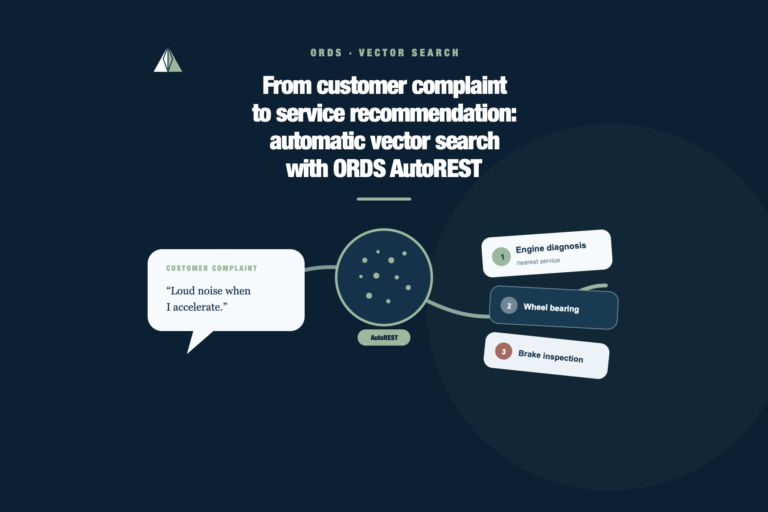
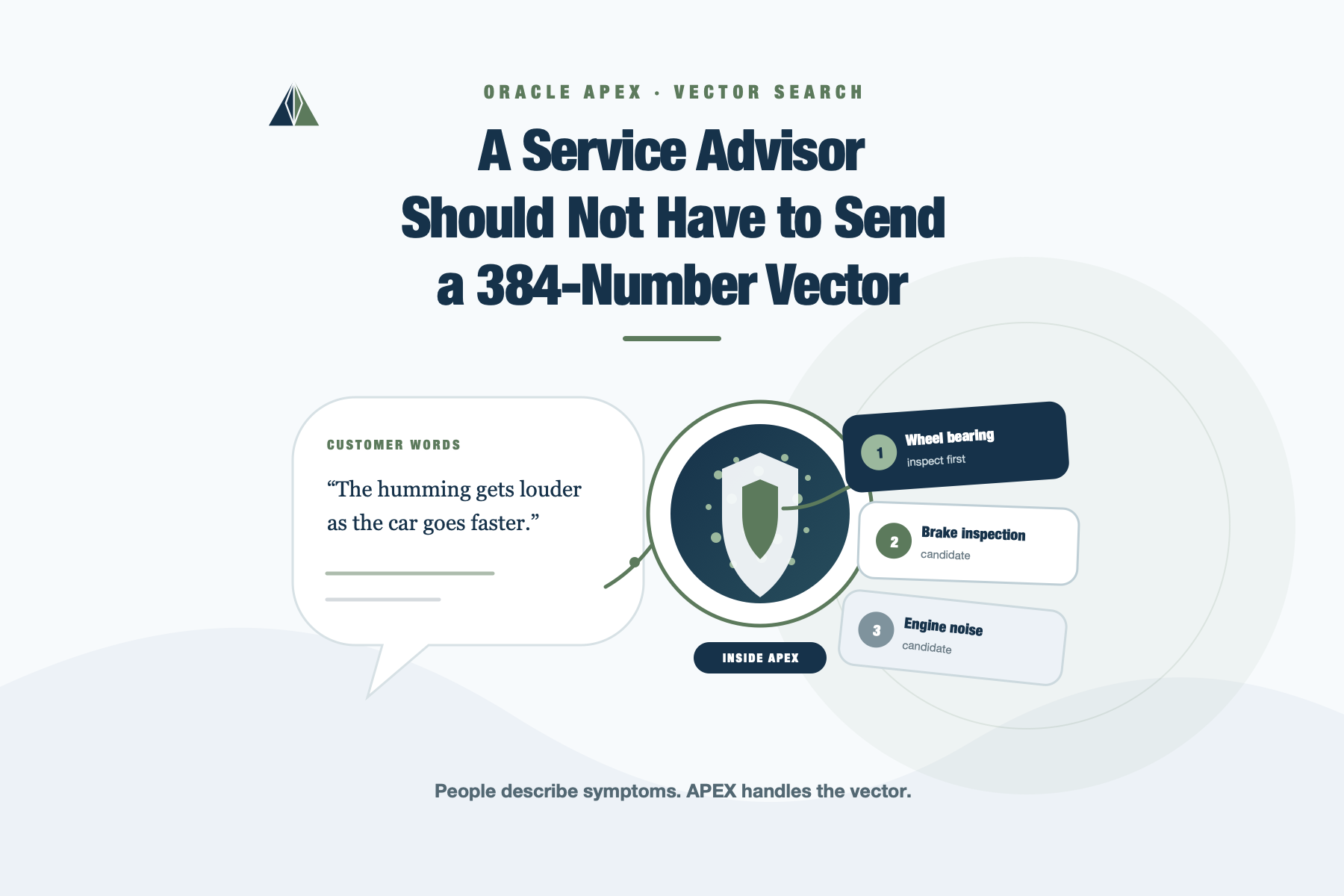
A Service Advisor Should Not Have to Send a 384-Number Vector
In the first version of this case, I deliberately stopped when the API worked. Oracle AI Database produced the embeddings, ORDS AutoREST exposed the vector search endpoint, and Postman returned the expected service candidates. That was enough to prove the technical flow, but it was a terrible interface for a service advisor.
The request body expected a vector with 384 numbers. A customer does not arrive at a workshop carrying one of those. The customer says something incomplete and ordinary, such as:
My car does not start.
Or:
I hear a humming noise that gets louder as I drive faster.
The useful boundary begins where a person can describe a symptom in their own words and receive a short list of services worth inspecting. The embedding should stay behind that boundary.
That gap is why I brought Oracle APEX into the experiment.
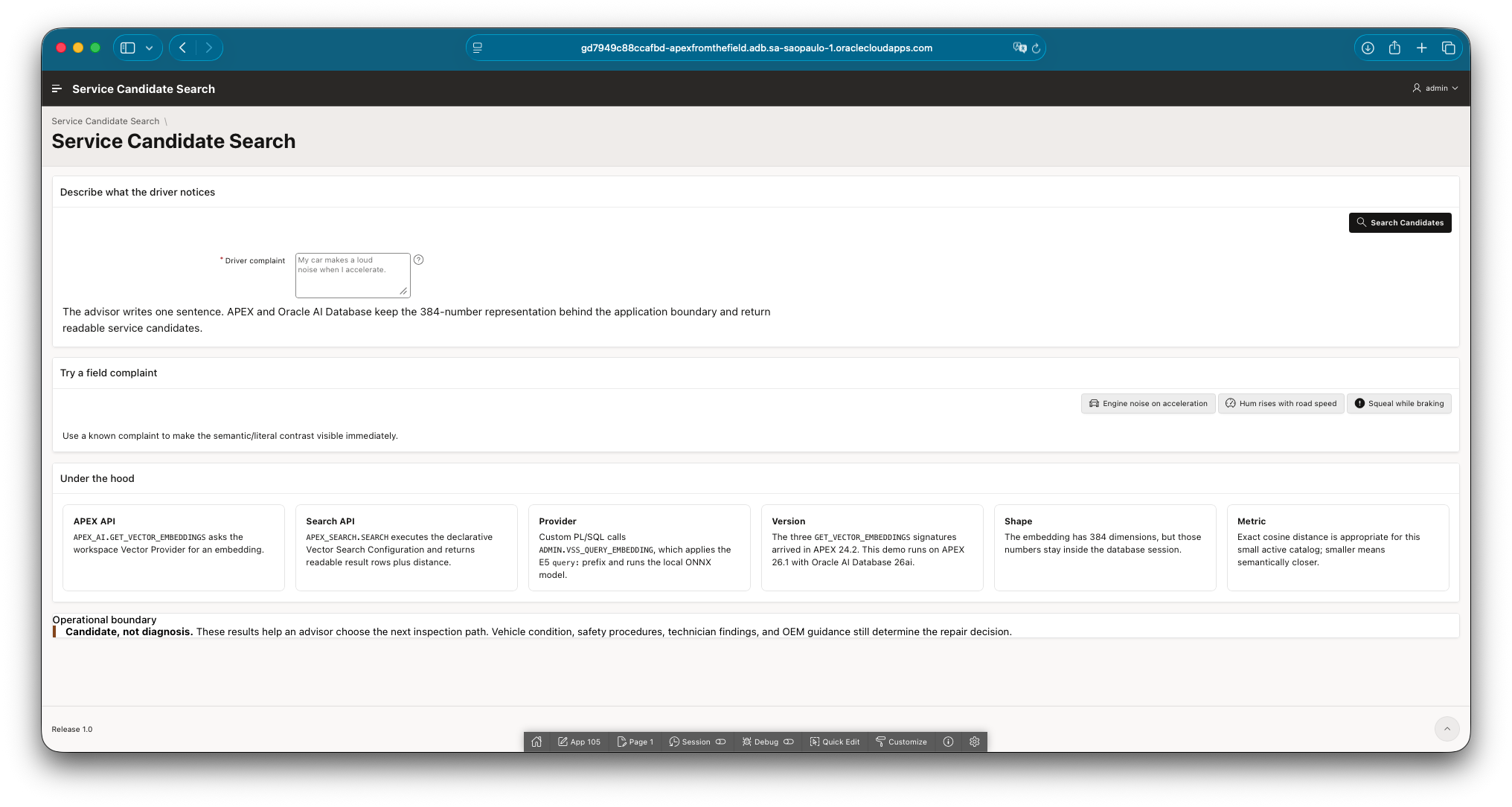
The advisor-facing page accepts ordinary complaint text while the embedding, provider, and distance calculation remain behind the application boundary.
The complete APEXLang application and database scripts are available in the public apex-vector-service-search repository. It contains the APEXLang source rather than an App Builder export dump, together with the catalog-expansion script, Vector Provider bridge, setup notes, and checks used in this post.
The earlier API still matters
The previous ORDS AutoREST experiment was not throwaway work. It established three things that I wanted to preserve:
- the service catalog stores passage embeddings produced by
VEHICLE_E5_SMALL; - customer complaints use the same model with the E5
query:prefix; - cosine distance ranks the active services, but the result is still a candidate rather than a diagnosis.
What changed was the application boundary. Postman sent a complete vector because the goal was to inspect the AutoREST contract. The APEX page sends the complaint text. The database creates and consumes the vector without returning it to the browser.
That separation may sound cosmetic when the table has only a few rows. Once a page starts moving embeddings through JavaScript, hidden items, JSON payloads, or session state, however, the vector representation becomes part of the UI contract. I would rather keep the page coupled to a provider name and a search configuration than to the physical shape of a model output.
The feature arrived in APEX 24.2
This lab runs on Oracle APEX 26.1, but the version history is worth stating accurately. Oracle APEX 24.2 introduced Oracle Vector Search Configurations and the three signatures of APEX_AI.GET_VECTOR_EMBEDDINGS.
Those signatures cover three useful levels of coupling:
- ask a configured Vector Provider for an embedding by static ID;
- call a local ONNX model by owner and model name;
- delegate embedding generation to a custom PL/SQL function.
The first form is the cleanest application-facing contract because the page knows the provider, not the model location. The second is useful when the local model is the intentional dependency. The third gives PL/SQL control over preprocessing or another embedding implementation.
For this application, the preprocessing contract decided the provider design.
The small query: prefix that I did not want to lose
The multilingual E5 model used in the first experiment follows an asymmetric convention. Catalog descriptions were embedded as passages:
'passage: ' || symptom_description
Customer text was embedded as a query:
'query: ' || customer_complaint
Dropping that distinction while moving into APEX would make the new interface look correct while quietly changing the retrieval behavior. I used a workspace-level Custom PL/SQL Vector Provider backed by a small definer-rights function:
create or replace function vss_query_embedding (
    p_value in varchar2
) return vector
    authid definer
as
    l_embedding vector;
begin
    if trim(p_value) is null then
        raise_application_error(-20001, 'Complaint text is required.');
    end if;

    select vector_embedding(
               vehicle_e5_small
               using 'query: ' || trim(p_value) as data
           )
      into l_embedding
      from dual;

    return l_embedding;
end vss_query_embedding;
/
APP_DEMO, the parsing schema, receives EXECUTE on this function and SELECT on the service catalog.
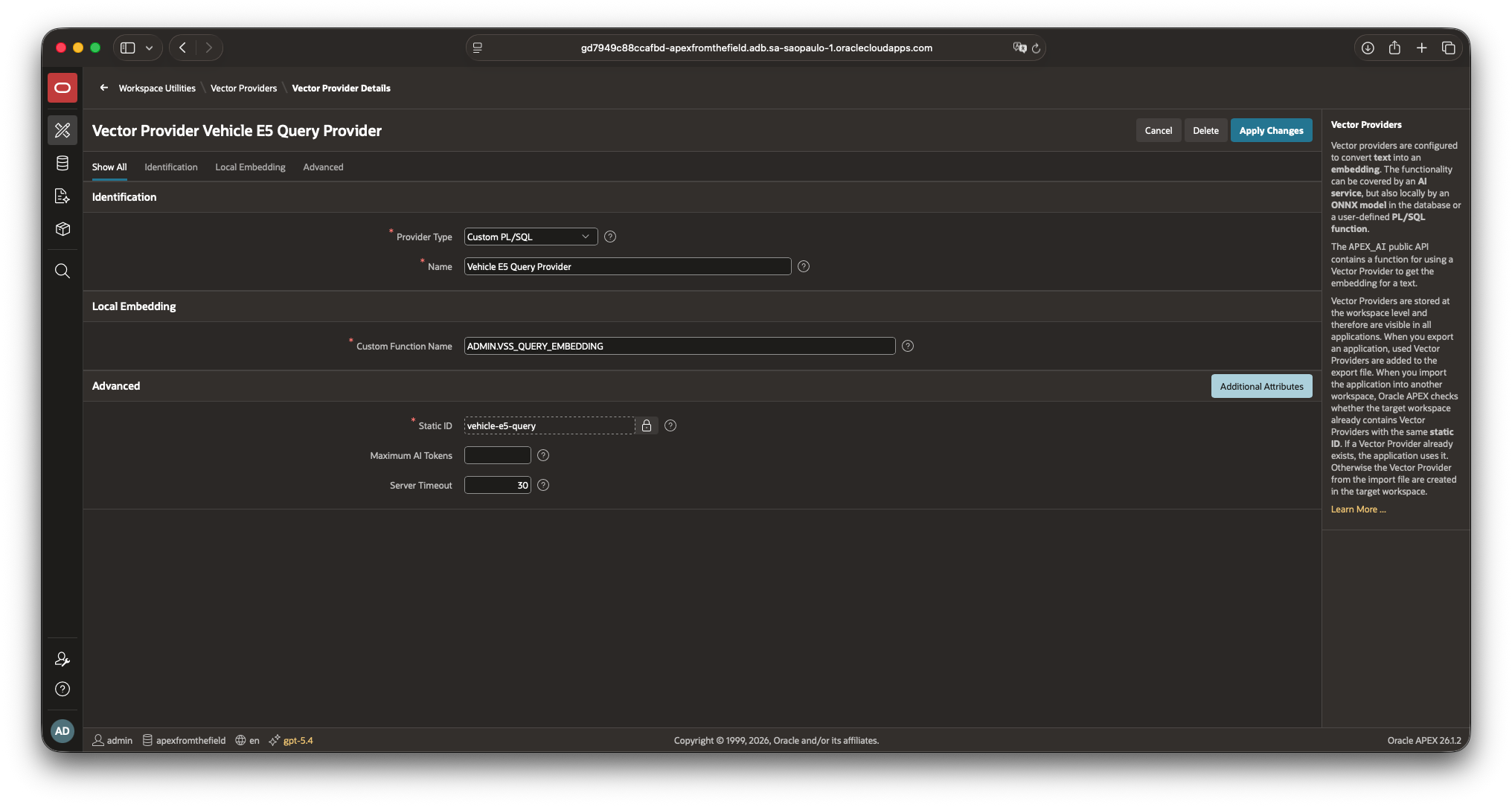
The workspace provider gives the query-embedding function a stable APEX identity.
The provider gives the embedding capability a stable workspace identity. If the implementation later moves to another model or a managed service, the application contract can remain the same.
A 200-service catalog makes the screen more honest
The original 30-row catalog was enough to prove the endpoint, but it made every good result feel a little too easy. For this APEX version, I expanded it to 200 synthetic services:
- 29 active services from the original lab;
- one inactive legacy service retained as a filtering check;
- 170 additional active services across engine, fuel, drivetrain, brakes, steering, suspension, electrical, climate, safety, and driver-assistance systems.
All 200 rows have 384-dimensional passage embeddings. The expansion script is idempotent, uses stable LAB-* service codes, and refuses to commit unless it finds exactly 200 catalog rows and 200 embeddings.
TOTAL_ROWS  ACTIVE_ROWS  EMBEDDED_ROWS  EXPANSION_ROWS
----------  -----------  -------------  --------------
       200          199            200             170
I am still using exact cosine search. With 199 active rows, it is simpler and easier to explain than adding an approximate index merely because vector indexes exist. Scale and index behavior deserve a separate test with a catalog large enough to make the trade-off visible.
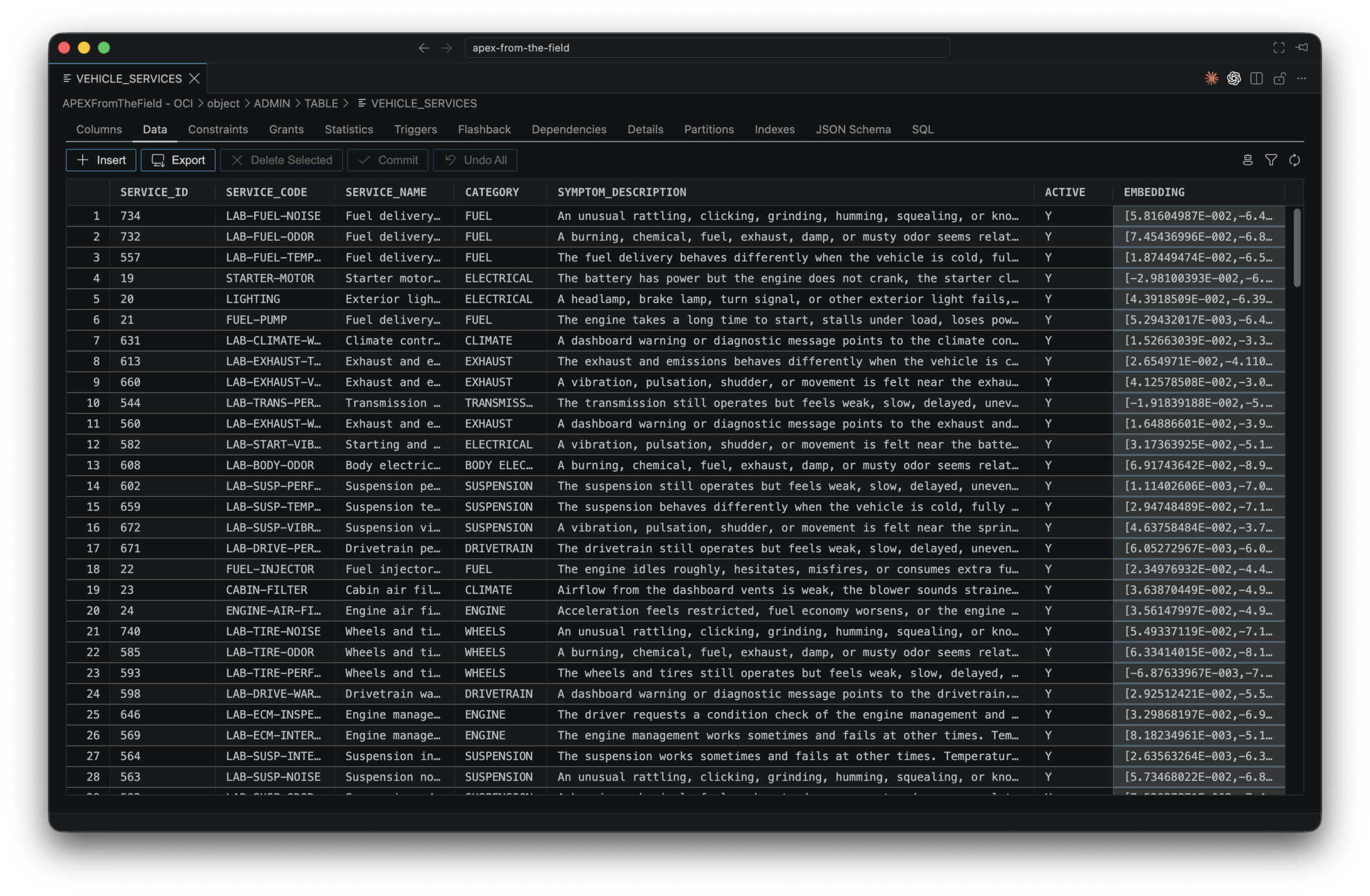
Readable service attributes and their 384-dimensional embeddings live in the same catalog. The complete row-count verification appears later with the regression checks.
Letting the Search Configuration own retrieval
The Oracle Vector Search Configuration is the contract between the catalog and the page. It keeps row eligibility, embedding generation, distance calculation, result limits, and output mappings in one shared component instead of scattering those decisions through page SQL.
The inactive ENG-NOISE-OLD row therefore never reaches the page, even if its description is semantically close. This is a small example of a rule I use often with AI features: deterministic business filters should remain deterministic. Similarity can rank the eligible rows; it should not decide which rows are eligible.
The edit page is dense because a Search Configuration has several jobs. It identifies the search, chooses the eligible rows, tells APEX how to create and compare vectors, and maps database columns to the stable result shape returned by APEX_SEARCH.SEARCH. Reading it from top to bottom makes the design much easier to follow.
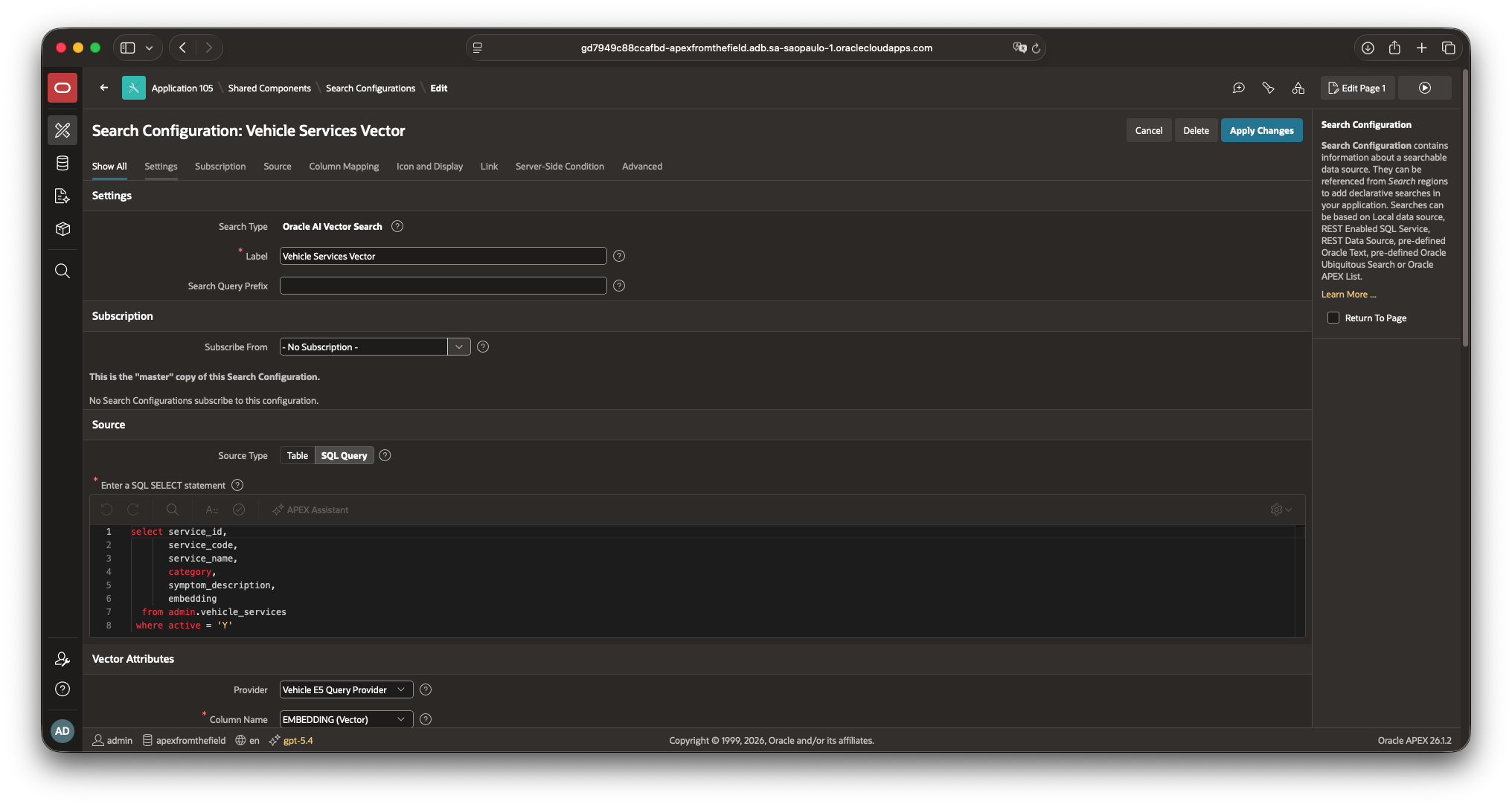
The SQL source decides which services are eligible before APEX calculates vector distance.
Settings and source
| Option | Value in this application | What it controls |
|---|---|---|
| Search Type | Oracle AI Vector Search | Selects semantic retrieval. APEX converts the user’s text into a query embedding and ranks source rows by their vector distance. This is different from Standard search, which relies on textual matching. |
| Label | Vehicle Services Vector | Gives the configuration a readable name in Shared Components and in declarative Search results. A Search region can override the displayed label without changing the configuration itself. |
| Search Query Prefix | Empty | Routes part of a unified search expression to a particular configuration. For example, a prefix such as service: could restrict a query to service results when several configurations share one search field. This application has one semantic source, so a prefix would add syntax the advisor does not need. |
| Subscribe From | No Subscription | Controls shared-component inheritance. A subscribed configuration receives its definition from a master configuration in another application. This demo owns its configuration locally, so there is no master to refresh from. |
| Source Type | SQL Query | Defines where candidate rows come from. Table is convenient when every row is eligible and the configuration maps directly to one object. SQL Query lets this application enforce the active-service rule and expose only the columns that belong in the search contract. |
The Search Query Prefix deserves a warning because it resembles the E5 query: prefix used elsewhere in the post. They are unrelated. The APEX prefix routes a user’s search between Search Configurations. The E5 prefix is added inside ADMIN.VSS_QUERY_EMBEDDING to format text for the embedding model. Leaving the APEX field empty does not remove the E5 prefix.
The source query is short, but it carries one of the most important decisions in the configuration:
select service_id,
       service_code,
       service_name,
       category,
       symptom_description,
       embedding
  from admin.vehicle_services
 where active = 'Y'
SERVICE_ID identifies the result. The next four columns supply readable application data. EMBEDDING is the stored passage vector used for comparison. The ACTIVE = 'Y' predicate runs before similarity ranking, which means an inactive service cannot win merely because its description happens to be close to the complaint.
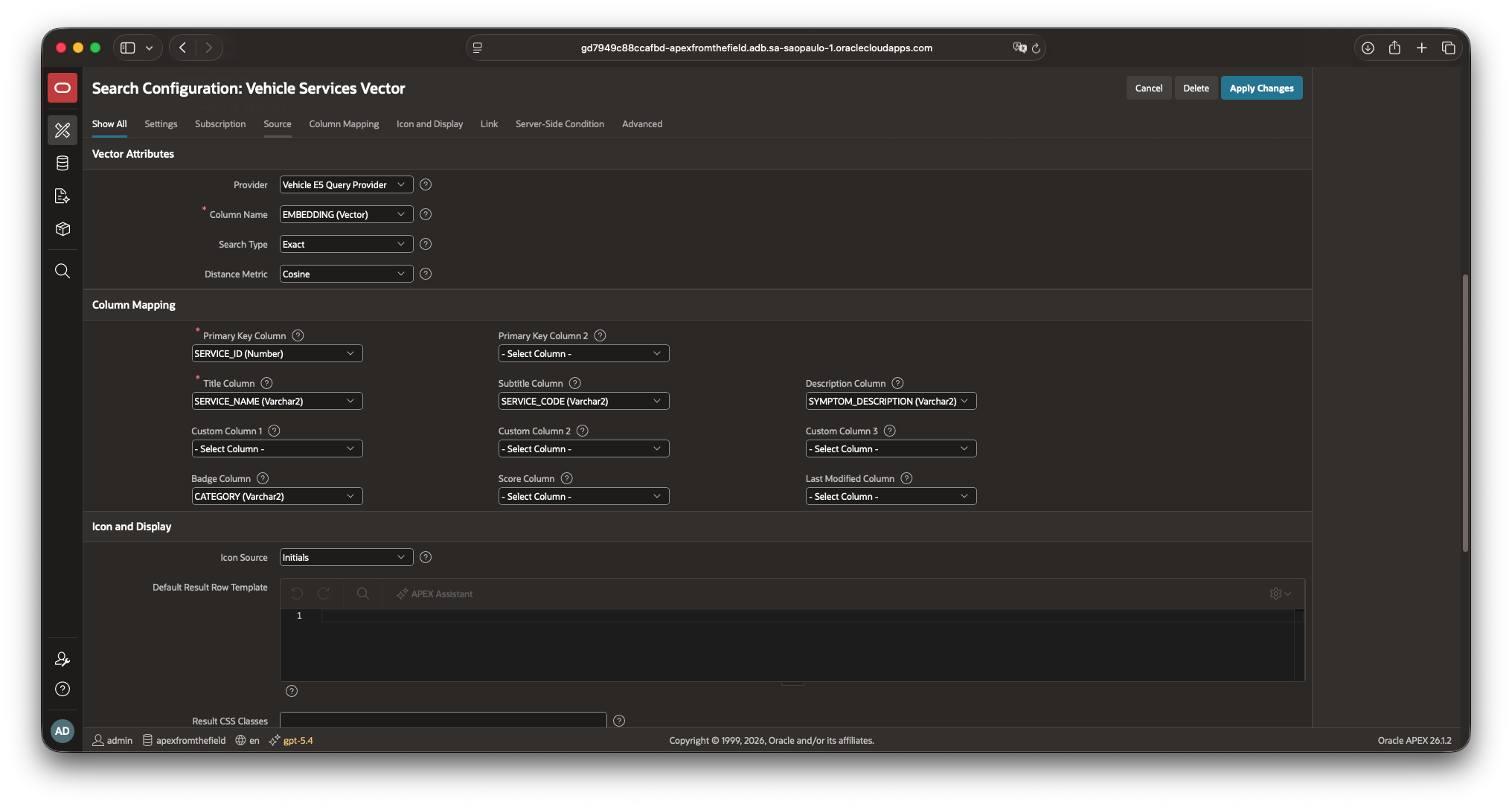
Vector attributes define the comparison; column mappings define the stable result rows returned to the application.
Vector attributes
| Option | Value in this application | What it controls |
|---|---|---|
| Provider | Vehicle E5 Query Provider | Converts the advisor’s complaint into the query vector. It calls ADMIN.VSS_QUERY_EMBEDDING, which adds the E5 query: prefix and uses the same ONNX model that produced the catalog embeddings. Selecting a provider backed by a different model would make the distances meaningless even if both models returned 384 numbers. |
| Column Name | EMBEDDING | Identifies the source column containing the stored passage vectors. Its dimensions and element format must be compatible with the vector returned by the provider. |
| Search Type | Exact | Compares the query vector with every eligible vector and then returns the closest rows. Exact search gives deterministic nearest-neighbor results without depending on a vector index. An approximate search becomes attractive for a much larger catalog, where a vector index can reduce latency in exchange for a configurable accuracy target. |
| Distance Metric | Cosine | Measures the angle between the query and catalog vectors. Smaller cosine distance means closer semantic direction; it does not mean confidence. The metric must agree with the model’s retrieval contract and, when approximate search is used, with the vector index. |
Exact search is intentional here. After the deterministic filter there are only 199 active vectors, so scanning all of them keeps the example easy to reproduce and removes index accuracy from the experiment. If the catalog grows enough to justify approximate search, target accuracy, index type, latency, and retrieval quality need to be measured together rather than changed as an isolated dropdown choice.
Column mapping
The mappings turn arbitrary SQL column names into the fixed columns returned by APEX_SEARCH.SEARCH. This is why the page query can select TITLE, SUBTITLE, DESCRIPTION, and BADGE without knowing the original table layout.
| Mapping | Selected column | Result exposed by APEX |
|---|---|---|
| Primary Key Column | SERVICE_ID | Becomes PRIMARY_KEY_1, the stable identity of the service row. Primary Key Column 2 is only needed for a composite key, so it remains empty here. |
| Title Column | SERVICE_NAME | Becomes TITLE and supplies the main human-readable result text. |
| Subtitle Column | SERVICE_CODE | Becomes SUBTITLE; the report uses it as the concise service code. |
| Description Column | SYMPTOM_DESCRIPTION | Becomes DESCRIPTION, giving the advisor the catalog symptom that made the candidate relevant. |
| Badge Column | CATEGORY | Becomes BADGE, a compact category such as ENGINE, BRAKES, or DRIVETRAIN. |
| Custom Columns 1-3 | Empty | Can carry three extra source values as CUSTOM_01, CUSTOM_02, and CUSTOM_03. The current report does not need more fields, so leaving them empty keeps the result contract small. |
| Score Column | Empty | Maps a score already produced by a source query. Vector distance is returned separately as DISTANCE, so mapping it as a generic score would hide the fact that lower values are better. |
| Last Modified Column | Empty | Can expose a source timestamp as LAST_MODIFIED. Service definitions in this lab do not use freshness in display or ranking. |
Icon Source is set to Initials, which lets a declarative Search result derive an icon from the title without storing an image or CSS class in the catalog. The application uses a custom Interactive Report over APEX_SEARCH.SEARCH, so the icon setting does not affect the table shown in this demo. It still belongs to the reusable Search Configuration contract.
Two settings farther down complete the application-facing contract. Maximum Rows to Return is 5, which prevents the advisor screen from turning into a catalog dump. The Static ID is vehicle-services-vector; that is the durable identifier passed to APEX_SEARCH.SEARCH, while the label remains free to change for display purposes.
APEX_SEARCH.SEARCH gives the page readable rows
The page does not select the vector column or calculate the distance expression itself. Its semantic Interactive Report calls the configured search through APEX_SEARCH.SEARCH:
select to_number(primary_key_1) as service_id,
       subtitle as service_code,
       title as service_name,
       badge as category,
       description as symptom_description,
       round(distance, 6) as distance,
       case result_seq
           when 1 then 'Closest semantic candidate'
           else 'Semantic candidate #' || result_seq
       end as rank_label
  from table(
         apex_search.search(
             p_search_expression => :P1_COMPLAINT,
             p_search_static_ids  => apex_t_varchar2(
                                         'vehicle-services-vector'
                                     )
         )
       )
 order by distance, service_id
This is the point where the vector becomes useful application data again. The report receives service names, descriptions, categories, rank, and distance. It does not receive 384 values that the advisor cannot act on.
I kept the distance visible because this is a technical demo and I want to inspect how the ranking behaves. The label says cosine distance, not confidence. A result with distance 0.09 is closer than one with 0.20 in this configuration, but neither value means “91% confident.”
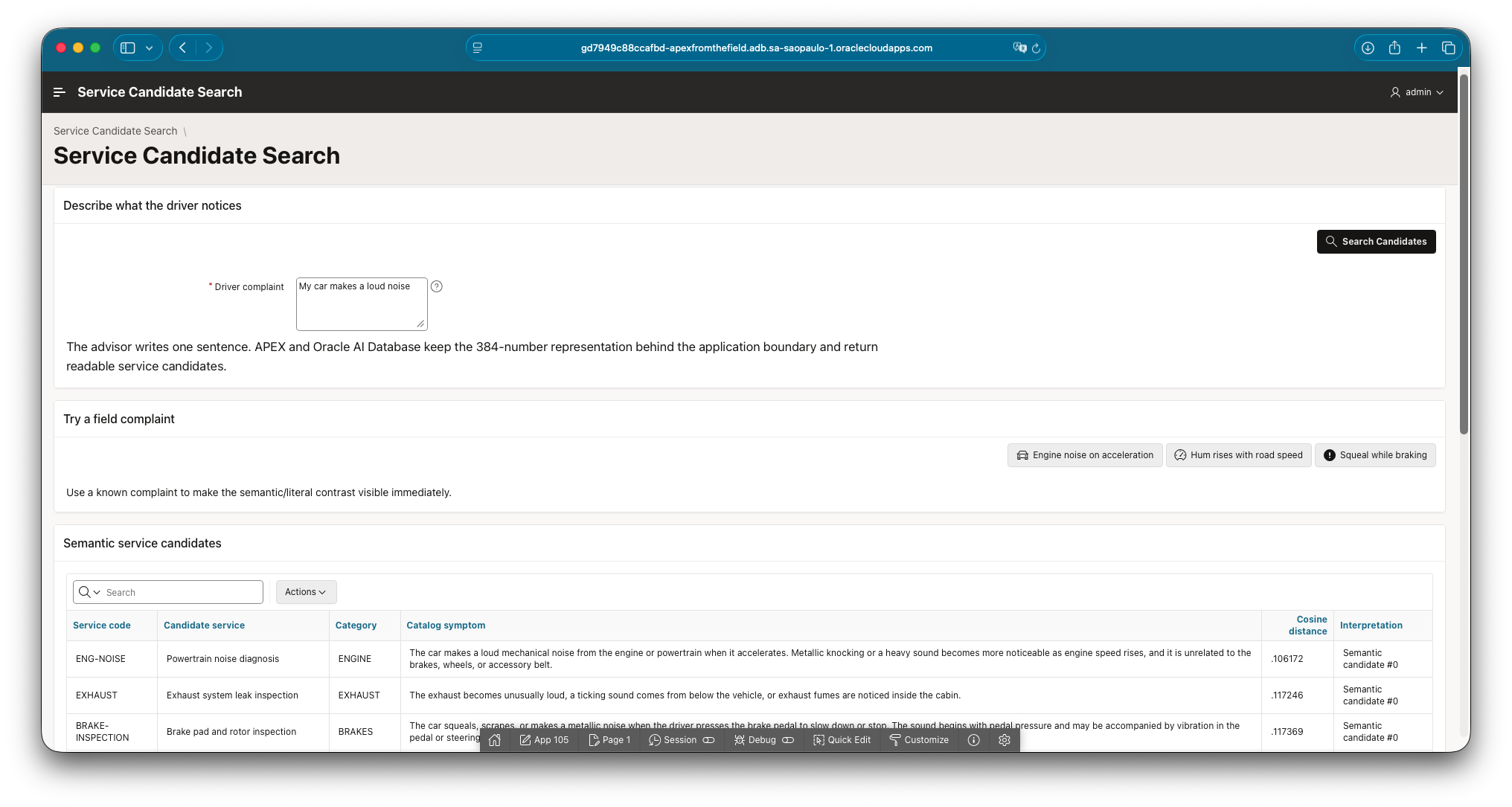
Ordinary complaint text produces readable service candidates while the vector remains inside the database.
The literal baseline earns its place on the page
Beside the semantic result, the app runs a deliberately strict whole-phrase search:
instr(
    lower(service_name || ' ' || symptom_description),
    lower(trim(:P1_COMPLAINT))
) > 0
That query is not presented as a serious keyword-search implementation. It is there to make the semantic difference visible. The customer sentence can fail to appear verbatim in the catalog while the vector search still returns the relevant service.
This comparison is more useful than displaying the embedding. It shows the reader what changed in retrieval behavior without asking them to interpret a wall of floating-point numbers.
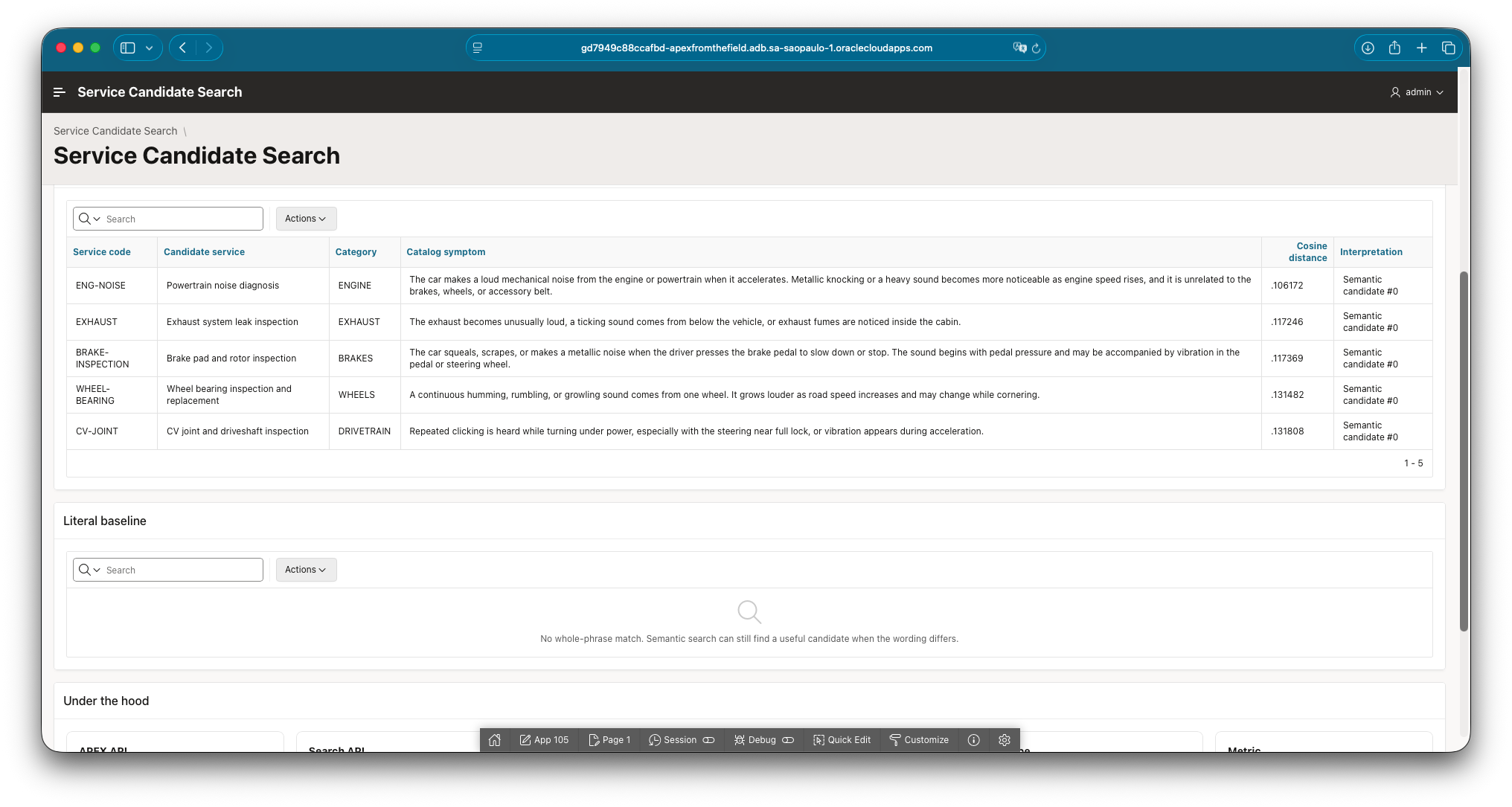
Semantic retrieval succeeds even though the complete customer sentence does not occur in the catalog.
Three old complaints against the larger catalog
Adding 170 services created a useful regression test. The original three complaints should keep their first result even though there are now many more semantically plausible competitors.
| Complaint | Expected first service | Result with 200 rows |
|---|---|---|
| My car makes a loud noise when I accelerate. | ENG-NOISE | Pass, distance 0.094884 |
| I hear a humming noise that gets louder as I drive faster. | WHEEL-BEARING | Pass, distance 0.088679 |
| The car squeals when I press the pedal to stop. | BRAKE-INSPECTION | Pass, distance 0.097051 |
Three passing examples are not a retrieval evaluation. They are regression checks carried forward from the earlier experiment. A proper evaluation needs labeled complaints, top-1 and top-3 measurements, and some attention to the wrong answers. That is a future post, not a percentage I want to invent here.
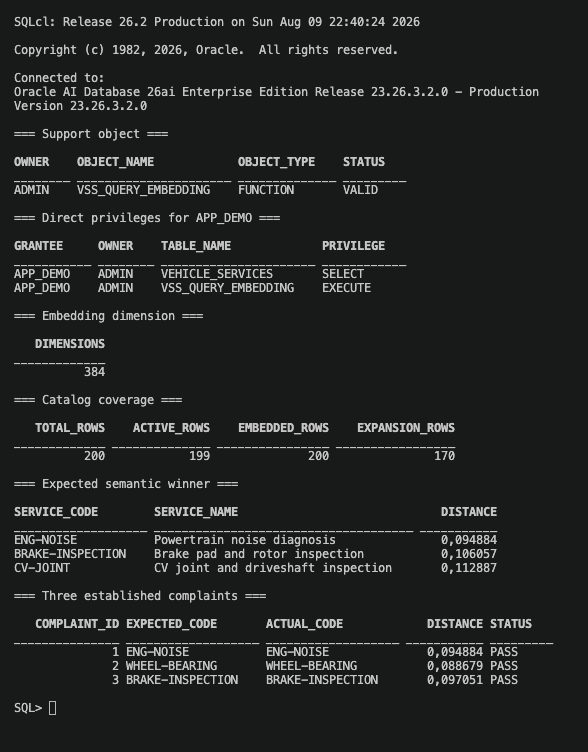
The larger catalog preserves the expected first result for all three regression complaints.
The page still needs an operational boundary
The phrase “service candidate” appears throughout the application on purpose. Vector similarity can help an advisor choose an inspection path. It cannot inspect the car, assess safety, apply OEM procedures, or replace the technician’s findings.
I added the warning directly to the page instead of leaving it for a footnote in the article:
Candidate, not diagnosis. These results help an advisor choose the next inspection path. Vehicle condition, safety procedures, technician findings, and OEM guidance still determine the repair decision.
That sentence is part of the application design. Once a ranked list reaches a business screen, people tend to read the first row as an answer. Naming the boundary beside the result is more useful than assuming everyone remembers how vector distance works.

The page makes both the technical boundary and the operational boundary visible.
Reproducing the flow
The GitHub repository contains:
- the complete APEXLang application;
- the idempotent 30-to-200 catalog expansion;
- the Custom PL/SQL Vector Provider bridge;
- setup and verification instructions;
- the exact APEXLang sources used to check and import application 105.
The repository links back to this article and to the original AutoREST lab, so the two experiments can be followed in order. Start with the AutoREST version if you want to inspect the raw vector-search contract. Start here if your main question is how that contract becomes an APEX screen.
Closing the gap left by Postman
Postman proved that ORDS could accept a query vector and return sensible service rows. The missing piece was a boundary a service advisor could actually use.
APEX now receives the customer’s sentence. The Vector Provider owns the query embedding. The Search Configuration owns retrieval and mappings. APEX_SEARCH.SEARCH returns readable candidates. Oracle AI Database keeps the 384-number representation where it belongs.
The result remains a candidate rather than a diagnosis, but it gives the advisor a much better place to start the inspection. That is exactly what this screen needed to do.
References
- Original ORDS AutoREST post
- Original AutoREST vector-search repository
- APEX Vector Service Search repository
- Oracle APEX 24.2 API changes
- Oracle APEX 26.1: Creating an Oracle Vector Search
- Oracle APEX 26.1: Managing Vector Providers
- Oracle APEX 26.1: Editing a Search Configuration
- Oracle APEX 26.1:
APEX_SEARCH.SEARCH - Oracle AI Database 26ai: Perform Exact Similarity Search