The Status Badge Did Not Belong in My SQL Query
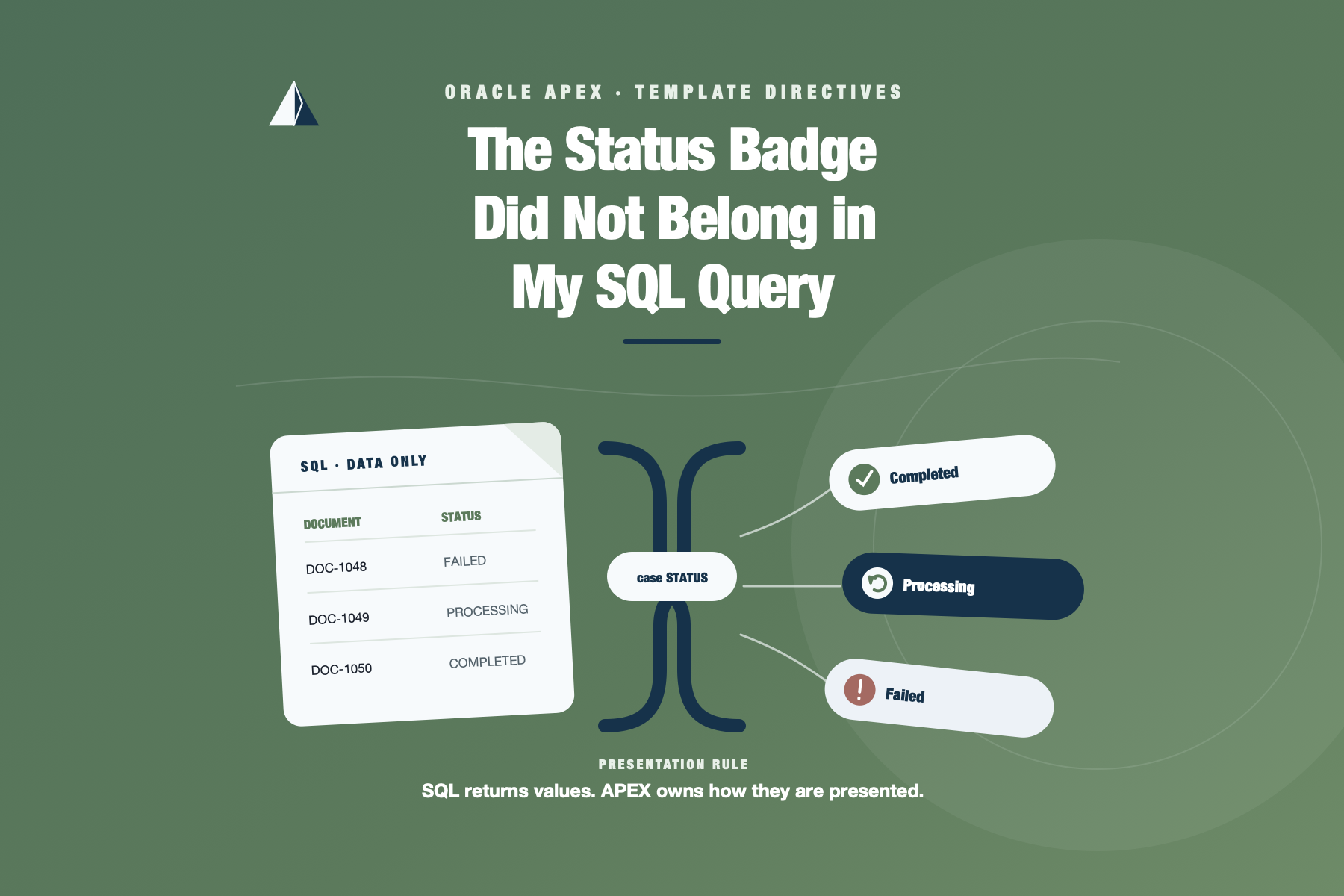
There was a point when one of my report queries stopped returning only business data. It also decided which CSS class represented an error, assembled pieces of HTML, omitted empty messages, and formatted small lists of labels. The report still worked, but the SQL had quietly become part query and part user interface.
I love Template Directives. I have been using them for a few years now, and these days I rarely pass up a good chance to use them. They are one of those APEX features I would genuinely miss.
They are not new. They arrived in Oracle APEX 20.2. Even so, this post has been on my list for a long time. People arrive at this blog with very different levels of APEX experience. For some readers, this will be familiar. For others, it may be the feature that lets the next report query return to being just a query.
This post uses a small integration queue to show the part I reach for most often: if, case, and loop. There is no custom JavaScript, no Template Component, and no attempt to turn a display feature into an application architecture. The example is one Classic Report whose query returns data and whose HTML Expression decides how that data should look.
The queue before the syntax
The demo contains six synthetic document-integration jobs. Some completed, one is still processing, another is waiting, and two failed for different reasons. One failure may be retried. The other needs configuration to change before another attempt would make sense.
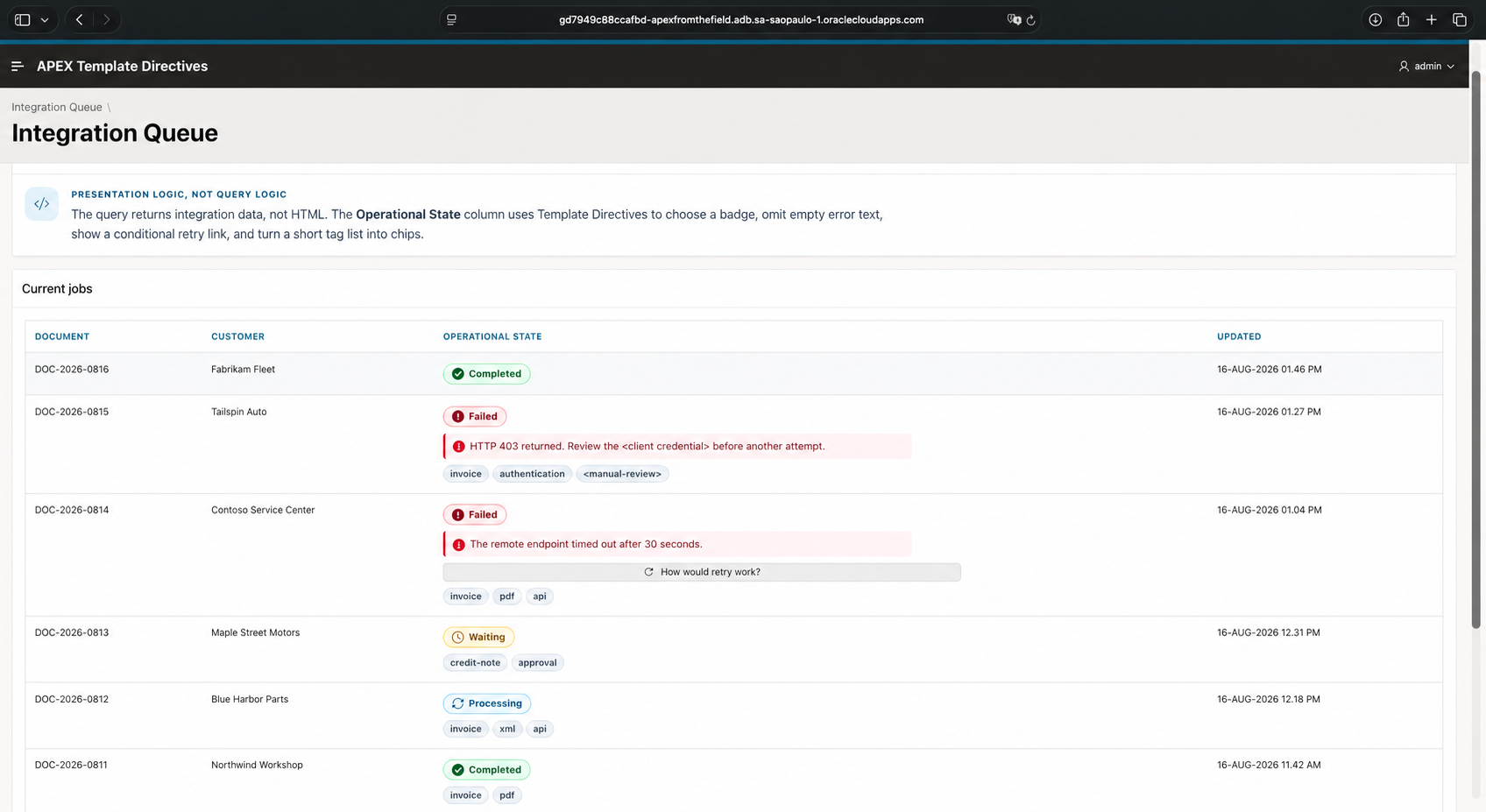
One Classic Report uses Template Directives to render status badges, optional errors, a conditional retry link, and tags.
The complete APEXLang application, database scripts, setup notes, and validation evidence are available in the public apex-template-directives repository.
Each row needs a little more than the raw status:
- a badge that makes the current state easy to scan;
- an error message only when one exists;
- a retry link only when retry is allowed;
- a short set of tags such as
invoice,pdf, andapi.
None of those requirements is difficult. The maintenance problem appears when the report query becomes the place where all four are implemented.
The query started writing the interface
I have written variations of this query more times than I care to admit:
select job_id,
       document_reference,
       customer_name,
       case status
         when 'COMPLETED' then
           '<span class="atd-status atd-status--completed">Completed</span>'
         when 'PROCESSING' then
           '<span class="atd-status atd-status--processing">Processing</span>'
         when 'WAITING' then
           '<span class="atd-status atd-status--waiting">Waiting</span>'
         when 'FAILED' then
           '<span class="atd-status atd-status--failed">Failed</span>'
       end ||
       case
         when error_message is not null then
           '<div class="atd-error">' ||
           apex_escape.html(error_message) ||
           '</div>'
       end as operational_state,
       updated_at
  from atd_integration_jobs
 order by updated_at desc, job_id
The escaping in that example matters, but it does not solve the design problem. The query knows about CSS classes and HTML structure. Adding a wrapper or changing a badge requires editing SQL. The expression grows again when retry availability and tags arrive. Someone inspecting the report in Page Designer sees a formatted column but has to open the source query to understand why it looks that way.
I do not think SQL formatting is always wrong. A database query sometimes needs to produce a complete document or a value with a defined external format. A status badge inside an APEX report is a different case. It belongs to the page presentation.
Returning data again
The source query in the demo is deliberately boring:
select job_id,
       document_reference,
       customer_name,
       status,
       updated_at,
       error_message,
       retry_allowed,
       tags
  from atd_integration_jobs
 order by updated_at desc, job_id
There is no HTML and no CSS class. STATUS remains a business value. ERROR_MESSAGE is still nullable text. RETRY_ALLOWED is Y or N, and TAGS is a colon-delimited value used only to keep this display experiment small.
The visual work moves to the HTML Expression of the STATUS report column. In a Classic Report, column values use the #COLUMN# substitution syntax. The directive itself refers to the column name without the surrounding hashes.
Choosing the badge with case
The first part maps each status to fixed markup:
{case STATUS/}
  {when COMPLETED/}
    <span class="atd-status atd-status--completed">
      <span class="fa fa-check-circle" aria-hidden="true"></span>
      Completed
    </span>
  {when PROCESSING/}
    <span class="atd-status atd-status--processing">
      <span class="fa fa-refresh" aria-hidden="true"></span>
      Processing
    </span>
  {when WAITING/}
    <span class="atd-status atd-status--waiting">
      <span class="fa fa-clock-o" aria-hidden="true"></span>
      Waiting
    </span>
  {when FAILED/}
    <span class="atd-status atd-status--failed">
      <span class="fa fa-exclamation-circle" aria-hidden="true"></span>
      Failed
    </span>
  {otherwise/}
    <span class="atd-status">#STATUS!HTML#</span>
{endcase/}
The comparison is case-sensitive, so the demo stores the allowed statuses in uppercase and enforces them with a check constraint. I also kept the CSS classes fixed inside each branch. The status value is not copied into a class attribute.
The otherwise branch is still useful even with a constraint. If the query later changes to use a view with another state, the page shows a neutral escaped value instead of silently removing the status.
This is the first small improvement I noticed after adopting Template Directives. The query returns the state, and the report column owns the visual mapping. I can change the icon or class without touching the data source.
Optional text and the two meanings of if
A failed integration may contain an error message. Successful and in-progress rows should not leave an empty error container behind.
{if ?ERROR_MESSAGE/}
  <div class="atd-error">
    <span class="fa fa-info-circle" aria-hidden="true"></span>
    <span>#ERROR_MESSAGE!HTML#</span>
  </div>
{endif/}
The question mark is worth noticing. A plain {if NAME/} follows the APEX character-Boolean convention: an empty value and the values F, N, and 0 are false. {if ?NAME/} asks a narrower question: does this value contain text?
For an error message, I care about presence. A message containing the single character N would be unusual, but it is still text and should be displayed. The explicit presence test describes that intent.
RETRY_ALLOWED is different. It deliberately follows the Y/N convention, so the plain form is exactly what I want:
{if RETRY_ALLOWED/}
  <a class="t-Button t-Button--small t-Button--iconLeft" href="f?p=&APP_ID.:1:&APP_SESSION.::&DEBUG.::::#retry-note">
    <span class="t-Icon fa fa-repeat" aria-hidden="true"></span>
    <span class="t-Button-label">How would retry work?</span>
  </a>
{endif/}
This is a useful boundary to see in practice. The directive decides whether the link is included. The href gives it behavior. In this demo, it uses a standard APEX f?p URL to reload page 1 in the current session and then move the browser to the note below the report. The reload is intentional: a bare #retry-note fragment changes the URL only on the first click, while reloading the page makes this tiny action repeatable.
So yes, a directive can conditionally produce a button or link that does something. The action itself does not come from the directive. A real retry could use a Dynamic Action, submit the page to a process, or call the server with Ajax. It would also need authorization, concurrency handling, auditing, and a clear definition of which failures are safe to repeat. Hiding the link is not authorization.
Turning a small list into chips
The last part of the expression formats a colon-delimited value:
{if ?TAGS/}
<div class="atd-tags" aria-label="Integration tags">
{loop ":" TAGS/}
<span class="atd-chip">&APEX$ITEM!HTML.</span>
{endloop/}
</div>
{endif/}
Inside the loop, APEX$ITEM is the current value and APEX$I is its one-based position. The outer if prevents an empty tags container when the source value is null.
This is convenient for presentation, but I would not use the example as an argument for storing every tag list in one column. If tags need referential integrity, independent filtering, analytics, or their own attributes, they deserve a relational model. Here they are small display metadata, which makes the loop a good fit.
Escaping did not become optional
Moving HTML out of SQL does not make substituted values safe by itself. ERROR_MESSAGE, STATUS, and each tag originate in the database, so the expression uses the HTML escape filter:
#ERROR_MESSAGE!HTML#
#STATUS!HTML#
&APEX$ITEM!HTML.
APEX also provides ATTR, JS, STRIPHTML, and RAW filters for other contexts. RAW is not a shortcut for values that happen to look trustworthy. The filter has to match where the value is being inserted.
The demo seed data includes an error message and a tag containing HTML-like characters. They appear as text on the page. They do not become elements.
The complete expression
The final Operational State expression keeps the three display decisions together:
<div class="atd-state">
{case STATUS/}
{when COMPLETED/}
<span class="atd-status atd-status--completed"><span class="fa fa-check-circle" aria-hidden="true"></span> Completed</span>
{when PROCESSING/}
<span class="atd-status atd-status--processing"><span class="fa fa-refresh" aria-hidden="true"></span> Processing</span>
{when WAITING/}
<span class="atd-status atd-status--waiting"><span class="fa fa-clock-o" aria-hidden="true"></span> Waiting</span>
{when FAILED/}
<span class="atd-status atd-status--failed"><span class="fa fa-exclamation-circle" aria-hidden="true"></span> Failed</span>
{otherwise/}
<span class="atd-status">#STATUS!HTML#</span>
{endcase/}
{if ?ERROR_MESSAGE/}
<div class="atd-error"><span class="fa fa-info-circle" aria-hidden="true"></span> <span>#ERROR_MESSAGE!HTML#</span></div>
{endif/}
{if RETRY_ALLOWED/}
  <a class="t-Button t-Button--small t-Button--iconLeft" href="f?p=&APP_ID.:1:&APP_SESSION.::&DEBUG.::::#retry-note">
    <span class="t-Icon fa fa-repeat" aria-hidden="true"></span>
    <span class="t-Button-label">How would retry work?</span>
  </a>
{endif/}
{if ?TAGS/}
<div class="atd-tags" aria-label="Integration tags">
{loop ":" TAGS/}<span class="atd-chip">&APEX$ITEM!HTML.</span>{endloop/}
</div>
{endif/}
</div>
It is more markup than the first badge-only CASE, of course. The difference is where that markup lives. Page Builder identifies the column as the presentation owner, while the source query remains useful as SQL outside the page.
A note about the CSS classes
Template Directives do not require custom CSS. They can emit classes already provided by APEX and Universal Theme. The conditional retry link above uses the native t-Button classes, and a-Chip is available when the standard APEX chip style is enough.
For this demo, I declared the custom .atd-* classes in the page’s Inline CSS attribute. That keeps the example self-contained and makes every style easy to inspect. In a larger application, shared styles would be better placed in an application static file, Theme Roller, or a reusable component.
Where I use directives now
This integration queue is fictional, but the pattern is not. I use directives when one result shape needs small per-row variations: optional secondary text, empty-state wording, a Boolean indicator, a short list, or a fixed visual mapping for a business status.
I still check the Page Designer help because directives are supported only in specific attributes. I also stop when the expression starts carrying business decisions. Eligibility, authorization, retry safety, and state transitions stay in the appropriate server-side layer.
That boundary is what makes the feature useful to me. Template Directives are small enough to solve presentation problems without asking the SQL query or a JavaScript renderer to take over the component.
The repetition that remains
Template Directives did not remove logic from the application. They put a small piece of presentation logic where an APEX developer is more likely to look for it. The query returned the integration state, the report decided how that state should be presented, and my future self no longer had to edit SQL just to change a badge.
This example deliberately stopped with if, case, and loop. The markup still belongs to this particular report. The next question appears when the same status block is needed in a report, a card, an email, and another application.
That is the point where copying the HTML Expression would create the next maintenance problem. A follow-up experiment will move this status presentation into a reusable Template Component, pass its values with with and apply, and compare server-side composition with named templates and apex.util.applyTemplate in the browser.
The badge has left the SQL query. Next time, it needs to stop being repeated across the application.