
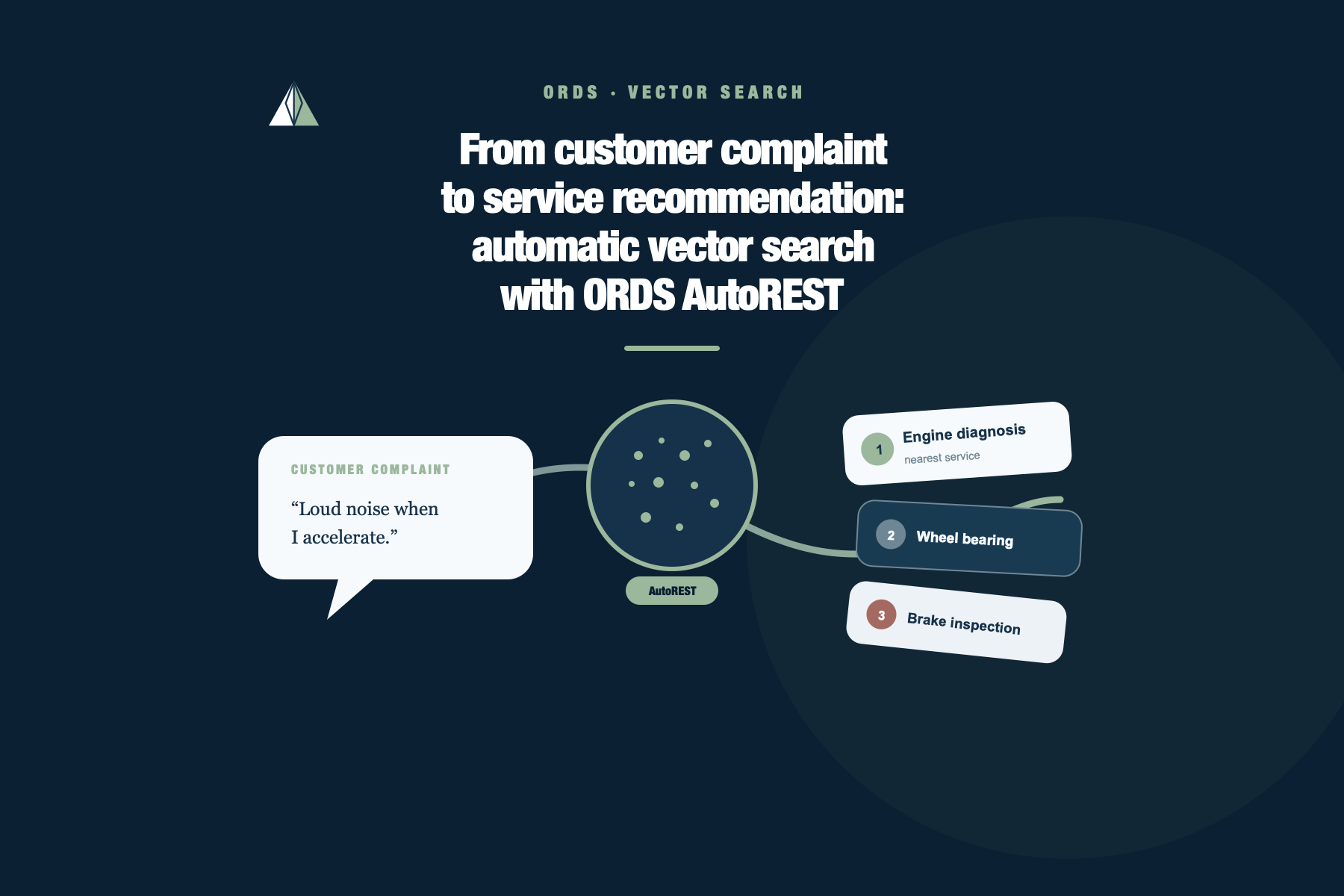
From customer complaint to service recommendation: automatic vector search with ORDS AutoREST
In March 2025, I earned the Oracle AI Vector Search Certified Professional certification. I studied vector fundamentals, embeddings, similarity search, and vector indexes. The concepts made sense, but I kept looking for small, practical places to use them.
ORDS gave me another one. With the automatic vectorSearch endpoint in AutoREST, I could take those concepts out of the study material and put them behind a working API without first building a custom REST module, template, and handler.
I did not pick a workshop at random. I spent years and years working in the vehicle dealership business, so the gap between a customer’s words and the service catalog is one I know well.
Imagine a customer arriving at a workshop and saying:
My car makes a loud noise when I accelerate.
The service catalog describes the same kind of problem differently:
Abnormal noise from the engine or powertrain as engine speed rises.
A traditional text search is literal. If the words do not match, the row may not match either.
select service_code,
       service_name
from   vehicle_services
where  lower(symptom_description)
       like '%loud noise when i accelerate%';
That query returned no rows in my test. A service advisor can still see the connection, but the LIKE predicate cannot.
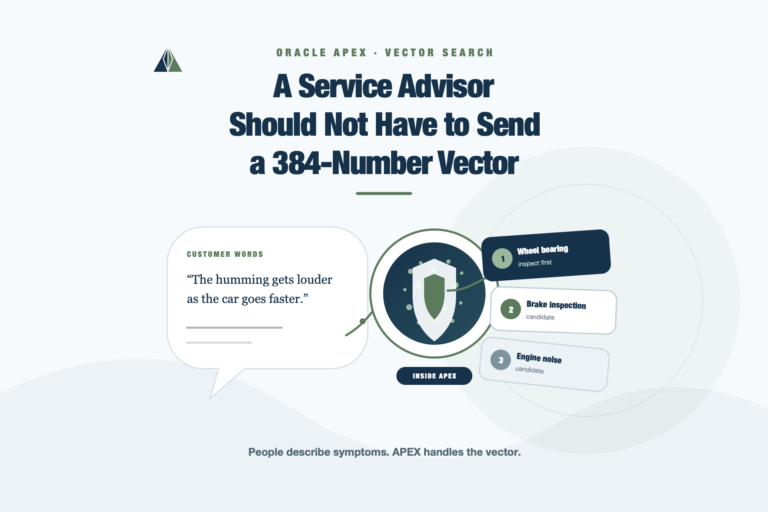
I used this gap to test a small triage flow: turn the customer’s description into an embedding, compare it with a synthetic service catalog, and return the three closest service candidates. The result is a recommendation for inspection, not a mechanical diagnosis.
The endpoint AutoREST adds
Starting with ORDS 26.1, an AutoREST-enabled table or view that contains a VECTOR column gets an additional endpoint:
POST /ords/<schema-alias>/<object-alias>/vectorSearch
For a table, ORDS also requires a primary key. The schema and object must be REST enabled. Once those conditions are met, I do not have to create a module, template, handler, or custom SQL statement with VECTOR_DISTANCE for this API.
I tested the example in my ADB - OCI environment:
| Component | Tested value |
|---|---|
| Oracle AI Database | 23.26.3.1.0 |
COMPATIBLE | 23.5.0 |
| ORDS repository | 26.2.1 |
| Schema alias | admin |
I ran database/00-check-environment.sql before setting up the lab. It reports the database version, COMPATIBLE, ORDS repository version, REST-enabled schema mapping, and the result of a small VECTOR smoke test.
The database meets the requirement for the VECTOR type: Oracle AI Database 26ai with COMPATIBLE set to at least 23.4.0.
The complete lab, including the model-loading script, 30-service catalog, request generator, verification queries, and cleanup, is available in the AutoREST vector service search repository on GitHub.
What vector search changes
An embedding model converts text into a list of numbers. Texts with related meanings should occupy nearby positions in that model’s vector space, even when they use different words.
The catalog description and the customer’s sentence become vectors. Oracle then measures the distance between the query vector and each stored vector. A smaller cosine distance means the two texts are closer according to the model.
The division of labor is simple: the ORDS endpoint expects a vector, not plain customer text. It will not accept this body:
{
  "problem": "My car makes a loud noise when I accelerate."
}
ORDS automates the REST search over stored vectors. The application, or in this lab the database itself, still has to generate the query embedding.
The ONNX embedding model
I used Oracle’s prebuilt multilingual_e5_small model. It is an E5 sentence-transformer packaged in ONNX format, supports multilingual text, and produces 384-dimensional embeddings. Its small size makes it a sensible fit for a compact lab where inference runs inside the database.
ONNX, short for Open Neural Network Exchange, is a portable format for trained machine-learning models. Oracle AI Database includes an ONNX runtime, so it can load a compatible model and run it without calling an external embedding API. Oracle publishes the model package together with the preprocessing and postprocessing needed for text input. The Oracle guide to importing pretrained ONNX models includes the download and specifications for multilingual_e5_small.
The loading steps are in database/01-load-model.sql. It downloads Oracle’s model package, extracts the ONNX file, loads it into the current schema, and removes the temporary file from DATA_PUMP_DIR.
I imported that ONNX file with this database model name:
VEHICLE_E5_SMALL
That name deserves a little explanation. VEHICLE_E5_SMALL is not another model, a SQL type, or an Oracle function. It is the identifier I assigned to the imported ONNX model in my schema when calling DBMS_VECTOR.LOAD_ONNX_MODEL. Oracle stores it as a mining model, which I can inspect in USER_MINING_MODELS and reference from SQL:
select model_name, mining_function, algorithm
from   user_mining_models
where  model_name = 'VEHICLE_E5_SMALL';
The same identifier appears in VECTOR_EMBEDDING:
select vector_embedding(
           vehicle_e5_small
           using 'query: My car makes a loud noise when I accelerate.' as data
       )
from dual;
Oracle resolves vehicle_e5_small to the model loaded in the current schema and returns its 384-number vector. If I had chosen WORKSHOP_MODEL during import, that would be the identifier in the SQL instead.
A 30-service catalog
The table is intentionally ordinary apart from its vector column:
create table vehicle_services (
service_id number generated always as identity primary key,
service_code varchar2(30) not null unique,
service_name varchar2(150) not null,
category varchar2(60) not null,
symptom_description varchar2(1000) not null,
active varchar2(1) default 'Y' not null,
embedding vector(384, float32),
constraint vehicle_services_active_ck
check (active in ('Y', 'N'))
);
I loaded 30 synthetic services. The catalog covers engine and powertrain noise, wheel bearings, belts, brakes, suspension, cooling, electrical faults, ignition, air conditioning, transmission, clutch, exhaust, tires, steering alignment, fuel delivery, body electrical systems, and driver-assistance sensors.
Here are five representative rows:
| Service code | Service name | Category | Symptom sample | Active |
|---|---|---|---|---|
ENG-NOISE | Powertrain noise diagnosis | Engine | Loud mechanical noise from the engine or powertrain while accelerating. | Y |
WHEEL-BEARING | Wheel bearing inspection and replacement | Wheels | Humming or growling that becomes louder as road speed increases. | Y |
BELT-TENSIONER | Accessory belt and tensioner inspection | Engine | High-pitched squeal from the belt area, often during a cold start. | Y |
BRAKE-INSPECTION | Brake pad and rotor inspection | Brakes | Squealing or scraping that begins when the brake pedal is pressed. | Y |
ENG-NOISE-OLD | Legacy engine noise procedure | Engine | Loud engine noise while the driver accelerates the vehicle. | N |
I shortened the symptom text for the table. The complete descriptions used to generate the embeddings are in database/02-create-catalog.sql.
One legacy engine-noise procedure is inactive on purpose. It gives the test a simple business rule: the closest semantic match must still be removed when active = 'Y' is applied.
The E5 family expects different prefixes for documents and search queries. I generated the catalog vectors with passage::
update /*+ no_parallel */ vehicle_services
set embedding = vector_embedding(
vehicle_e5_small
using 'passage: ' || symptom_description as data
);
The customer sentence uses query::
select vector_embedding(
           vehicle_e5_small
           using 'query: My car makes a loud noise when I accelerate.' as data
       )
from dual;
Both sides must use the same model and the same text convention. Vectors from unrelated models may have compatible-looking dimensions, but their distances have no useful semantic meaning.
I skipped a vector index because 30 rows are better served by an exact search. A larger production catalog would need its own index and accuracy tests.
Enabling AutoREST
database/03-enable-autorest.sql contains the call that REST-enables the table and confirms its vehicle-services alias:
begin
    ords.enable_object(
        p_enabled        => true,
        p_schema         => user,
        p_object         => 'VEHICLE_SERVICES',
        p_object_type    => 'TABLE',
        p_object_alias   => 'vehicle-services',
        p_auto_rest_auth => false
    );
    commit;
end;
/
This creates the lab endpoint at:
POST <ORDS_BASE_URL>/ords/admin/vehicle-services/vectorSearch
The public setting is acceptable only for this short-lived experiment with synthetic data. AutoREST exposes other table operations too. A production implementation needs ORDS privileges and authentication, and it may be safer to expose a constrained view instead of the base table.
Building request.json in VS Code
I used Oracle SQL Developer for VS Code for the database work and Postman for HTTP. That split makes the two parts of the flow easy to see in screenshots.
The project includes database/04-generate-request.sql. Its first lines contain the customer sentence:
with query_input (query_text) as (
    select 'My car makes a loud noise when I accelerate.'
    from   dual
)
select json_serialize(
    /* VECTOR_EMBEDDING and the request properties */
) as request_json
from query_input;
Run the script using your Oracle AI Database 26ai connection. If you want to test another complaint, change only the text inside the query_input CTE before running the statement.
The query returns one REQUEST_JSON CLOB containing the complete payload, including all 384 vector values. Copy that value into a local file named request.json; this is the file whose contents will be sent from Postman.
The beginning of the generated file looks like this. The "...382 more values..." text is only an abbreviation for the article; it is not present in the real request.
{
  "vector": [0.00370844011, -0.0267352872, "...382 more values..."],
  "vectorColumn": "embedding",
  "distanceMetric": "COSINE",
  "columns": [
    "service_code",
    "service_name",
    "category",
    "symptom_description"
  ],
  "filters": {
    "active": "Y"
  },
  "limit": 3,
  "ascending": true,
  "includeVectors": false
}
Each property controls part of the generated search:
| Property | Meaning in this request |
|---|---|
vector | The customer’s sentence converted by VEHICLE_E5_SMALL into 384 FLOAT32 numbers. It must be compatible with the vectors stored in the table. |
vectorColumn | The table column to compare with the query vector. It is optional when the object has only one vector column, but naming it keeps the request explicit. |
distanceMetric | COSINE tells ORDS how to measure distance. Without an index or an explicit metric, ORDS also defaults to cosine. |
columns | The business columns returned for each candidate. The embedding is deliberately absent. |
filters | A relational filter applied to the search. Here it removes the inactive legacy service before the top results are returned. |
limit | The maximum number of candidates returned, three in this test. |
ascending | Sorts the smallest distances first. With cosine distance, smaller means closer. |
includeVectors | Keeps the 384-number stored vectors out of the response. This reduces noise and payload size. |
There is one subtle interaction: if columns explicitly requests a vector column, ORDS returns it even when includeVectors is false. Oracle documents that behavior, the accepted distance metrics, defaults, filters, and response shape in Using REST-enabled objects for vector search queries.
Sending the request with Postman
In Postman, I created a new HTTP request with these settings:
- Method:
POST. - URL:
<ORDS_BASE_URL>/ords/admin/vehicle-services/vectorSearch. - Body: select
raw, chooseJSON, and paste the complete contents ofrequest.json. - Header: confirm
Content-Type: application/json. - Click Send.
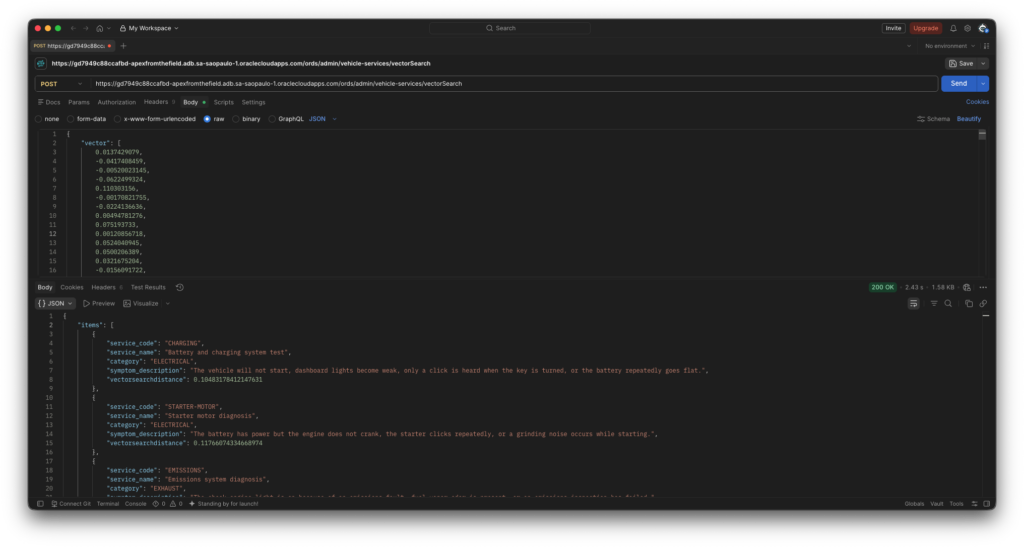
A successful response contains an items array. Each item has the requested catalog columns plus vectorsearchdistance. With limit: 3, I expect three items unless fewer rows satisfy the filter. With includeVectors: false, no embedding should appear in those items.
What the ranking showed
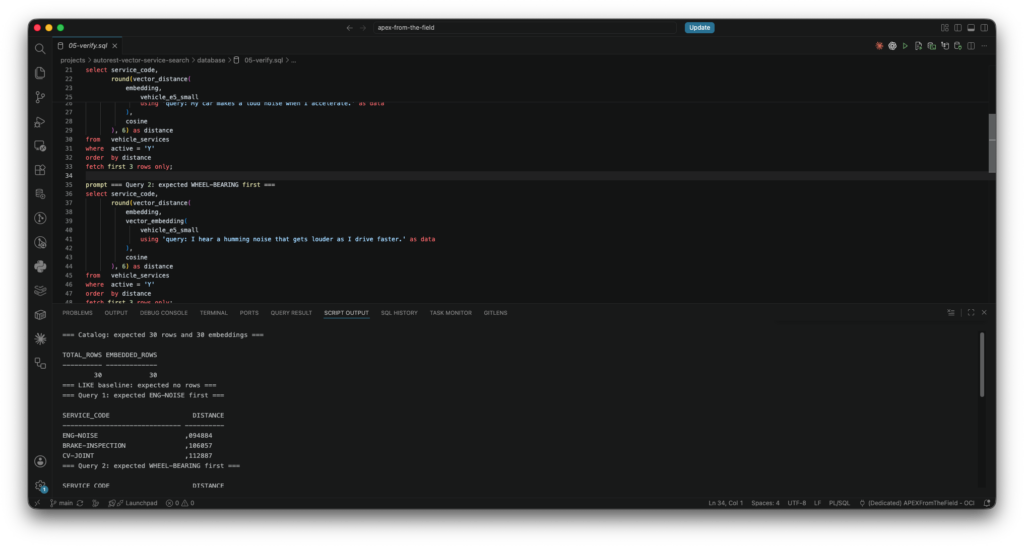
I kept the repeatable database-side check for this section in database/05-verify.sql. The script runs the LIKE baseline, the three customer complaints, and a control query without the active filter.
The Postman response can then be compared with the equivalent SQL used by the script:
select service_code,
       service_name,
       vector_distance(
           embedding,
           vector_embedding(
               vehicle_e5_small
               using 'query: My car makes a loud noise when I accelerate.' as data
           ),
           cosine
       ) as distance
from   vehicle_services
where  active = 'Y'
order  by distance
fetch first 3 rows only;
The three test complaints returned the intended first candidates:
| Customer description | First service |
|---|---|
My car makes a loud noise when I accelerate. | ENG-NOISE |
I hear a humming noise that gets louder as I drive faster. | WHEEL-BEARING |
The car squeals when I press the pedal to stop. | BRAKE-INSPECTION |
Without the active filter, the deliberately obsolete ENG-NOISE-OLD row ranked ahead of the current engine-noise service. With active = 'Y', it disappeared. That small check matters: semantic ranking does not replace ordinary business rules. It works with them.
The test also forced me to improve a few catalog descriptions. Belt noise and brake noise can both be described as a squeal. The useful distinction is where the sound comes from and whether it begins when the brake pedal is pressed. Semantic search does not rescue vague source data. It gives us a way to see where the ambiguity affects retrieval.
Distance is not confidence
ORDS returns vectorsearchdistance, which is a distance value rather than a confidence percentage. Because this request uses ascending cosine distance, lower values rank first.
I would not turn a distance of 0.10 into “90% confidence.” There is no basis for that conversion. A useful threshold has to come from an evaluated set of complaints with known relevant and irrelevant services. Until then, the response is a ranked candidate list.
The top row is not a diagnosis either. A customer may omit details, combine two faults, or describe a safety problem. A trained person still needs to inspect the vehicle.
Cleaning up the lab
database/06-cleanup.sql disables AutoREST before dropping VEHICLE_SERVICES and VEHICLE_E5_SMALL. It stops first if it finds dependencies, grants, or synonyms that would make the cleanup unsafe.
What ORDS leaves to us
ORDS removed the repetitive REST work from this experiment. I did not write a module, template, handler, or custom distance query for the endpoint.
The application still owns the rest:
- generating catalog and query embeddings with the same model;
- writing service descriptions that separate similar symptoms;
- securing the AutoREST object;
- choosing limits and evaluating retrieval quality;
- monitoring results and keeping a person in the diagnostic process.
That split works for me. The certification gave me the vocabulary and mechanics for vector search. This ORDS feature gave me a compact way to put those concepts behind an API and test them against a workshop problem. Thirty synthetic services are enough to prove the flow. The next iteration needs a better evaluation set built with people who know the vehicles.

One Comment