
When APEX Needs a Custom Home Page
Most of the time, when I build an APEX page, I try to stay inside the declarative model for as long as the page still feels honest. Native regions, template components, lists, cards, reports, buttons, dynamic actions, and Universal Theme options are usually easier to maintain because they remain visible in the Builder and other APEX developers can inspect them without reverse engineering a CLOB.
But not every page fits neatly into a standard shape.
Sometimes the requirement asks for a home page with a very specific composition. The business wants a first screen with metrics, queues, shortcuts, status signals, visual hierarchy, and a layout that feels intentionally designed around that particular workflow. The page still needs to live inside APEX, use APEX session state, navigate with APEX URLs, and respond to user actions.
That is where PL/SQL Dynamic Content becomes useful, as long as it is treated as a deliberate exception rather than a shortcut around the rest of APEX. It gives us room to compose custom HTML, CSS, and small interactions while still keeping the page inside the APEX runtime.
The demo case
For the demo, I built a fictional service operations home page.
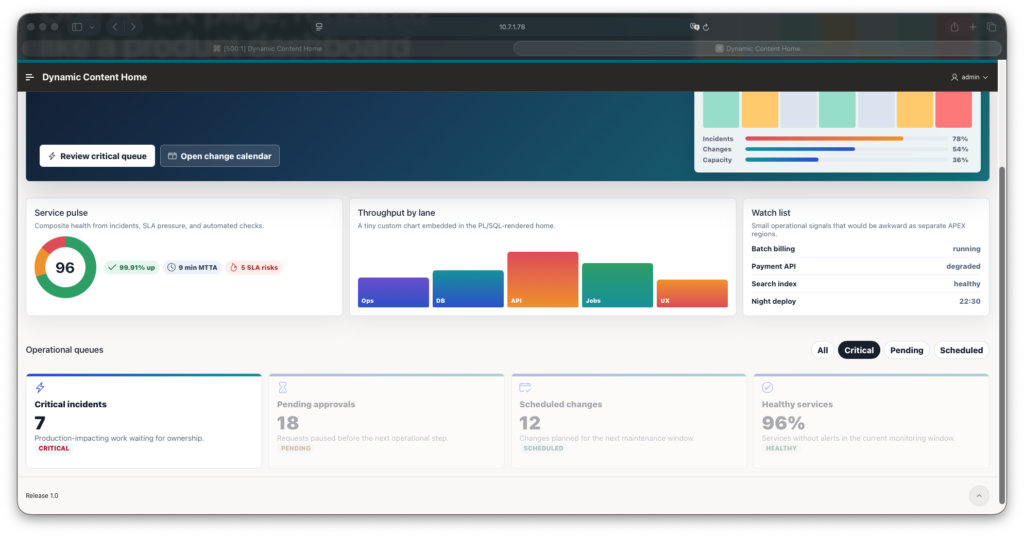
The first screen has a custom hero area, a risk index panel, a small heatmap, a CSS-based throughput chart, operational chips, queue cards, and action buttons that navigate to normal APEX pages. There is also a small client-side filter that changes which queue cards are emphasized without making a round trip to the server.
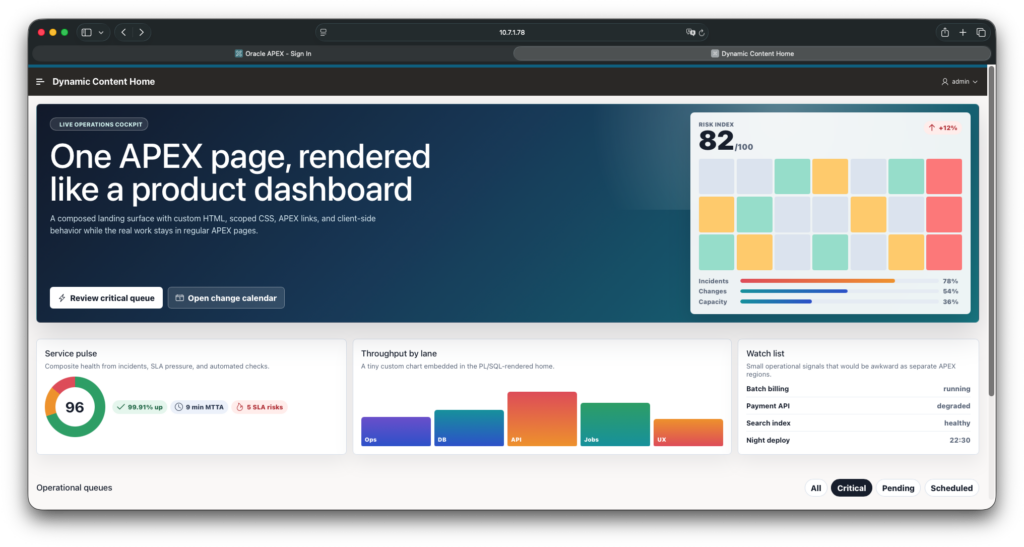
The point is not that this exact service desk page is special. The point is that the layout mixes several visual and interaction patterns in one composed surface.
That is precisely the kind of requirement where PL/SQL Dynamic Content can be a practical addition to the normal APEX toolbox. You may still use native regions for the surrounding application, but the highly composed entry point gets its own rendering code instead of forcing a very specific visual contract into several loosely related declarative pieces.
What the APEX page contains
The APEX page itself does not contain hundreds of lines of markup.
It has one PL/SQL Dynamic Content region with this source:
return apxdemo_dynamic_home_ui.render_home();
That is the main design choice.
APEX gives me the region type. PL/SQL gives me a rendering API. The page remains easy to inspect, and the generated UI lives in a package that can be reviewed like normal code.
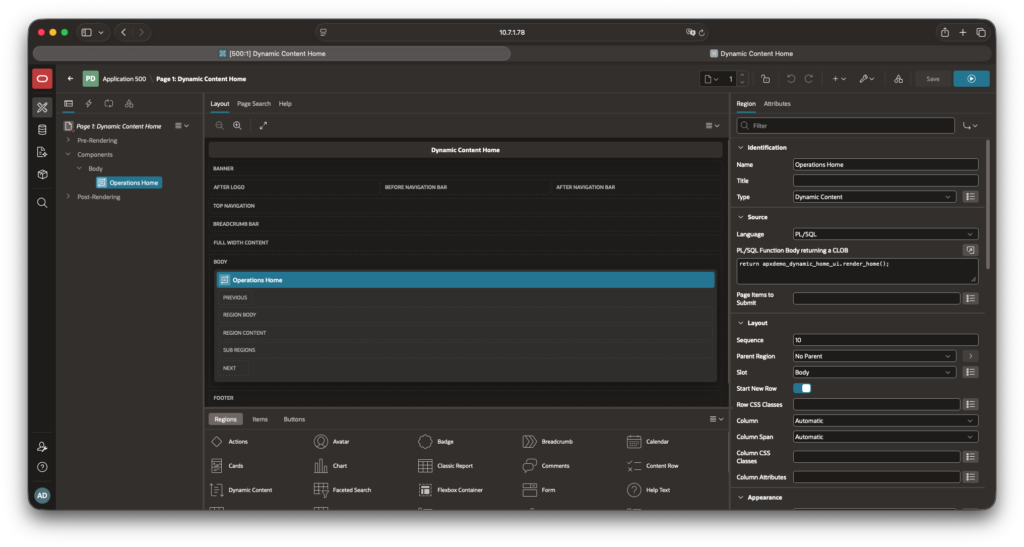
The package owns the HTML, CSS, and small JavaScript behavior. In a real project, I would usually move the CSS and JavaScript into static application files once the design stabilizes. For a compact demo, keeping them in the rendered CLOB makes the whole idea easier to study.
APEX links, not handmade URLs
The buttons and cards are not just decorative.
They navigate inside the application. The package generates those links with apex_page.get_url:
apex_page.get_url(
   p_page   => 2,
   p_items  => 'P2_QUEUE',
   p_values => 'CRITICAL'
)
That matters because the generated HTML is still part of an APEX application. I do not want to manually build f?p URLs and accidentally ignore session handling, checksums, modal behavior, or future application changes.
The HTML is custom and the navigation should still be APEX-aware.
Escaping is not optional
Dynamic Content gives us freedom, and that freedom needs a little discipline.
Whenever the package renders text, it uses escaping:
apex_escape.html(l_card.title)
For attributes, it uses the attribute-specific escaping function:
apex_escape.html_attribute(l_card.status)
In the demo, most values are hardcoded sample data. In a real application, those values often come from tables, configuration, user-owned content, or integration payloads. Escaping should be part of the pattern from the beginning, not a cleanup task after the page becomes important.
The interactive part
The page includes a tiny script that lets the user emphasize a queue group without making a round trip:
document.querySelectorAll(".dc-filter").forEach(function(button) {
  button.addEventListener("click", function() {
    var target = button.getAttribute("data-filter");

    document.querySelectorAll(".dc-queue-card").forEach(function(card) {
      card.toggleAttribute(
        "data-muted",
        target !== "ALL" && card.getAttribute("data-status") !== target
      );
    });
  });
});
This is a good fit for JavaScript: small, local, visual behavior.
If the action changes data, calls business logic, validates a rule, or affects workflow state, I would bring it back to APEX through a dynamic action, page process, AJAX callback, or package API. The custom HTML should not become a second application hidden inside the page.
Where I like this pattern
PL/SQL Dynamic Content works well when the output is a composed read-oriented surface. I would consider it for executive home pages, operational command centers, custom empty states, guided launchpads, or summaries that do not map cleanly to one native region.
The pattern becomes especially useful when each visual element still links back into normal APEX pages for the real work. In this demo, the home page is custom, but the queue page can still be a normal report, the detail page can still be a normal form, and the administrative pages can remain declarative.
That balance is important. The home page is allowed to be special because it is a composed entry point. The rest of the app does not need to inherit that complexity.
Where it starts to smell
I get nervous when Dynamic Content starts accumulating responsibilities that belong somewhere else. Complex DML, authorization logic mixed into HTML rendering, large JavaScript workflows, duplicated report behavior, business rules hidden in string concatenation, unescaped user content, and one giant PL/SQL block pasted directly into the region source are all signs that the escape hatch has become the architecture.
At that point, the page is not a custom APEX surface anymore. It is a private framework with no documentation.
The demo avoids that by drawing a clear line. The page calls one package function, the function renders HTML, links are generated through APEX APIs, text is escaped, client-side behavior stays small and visual, and the page remains only a home surface.
The Builder setup
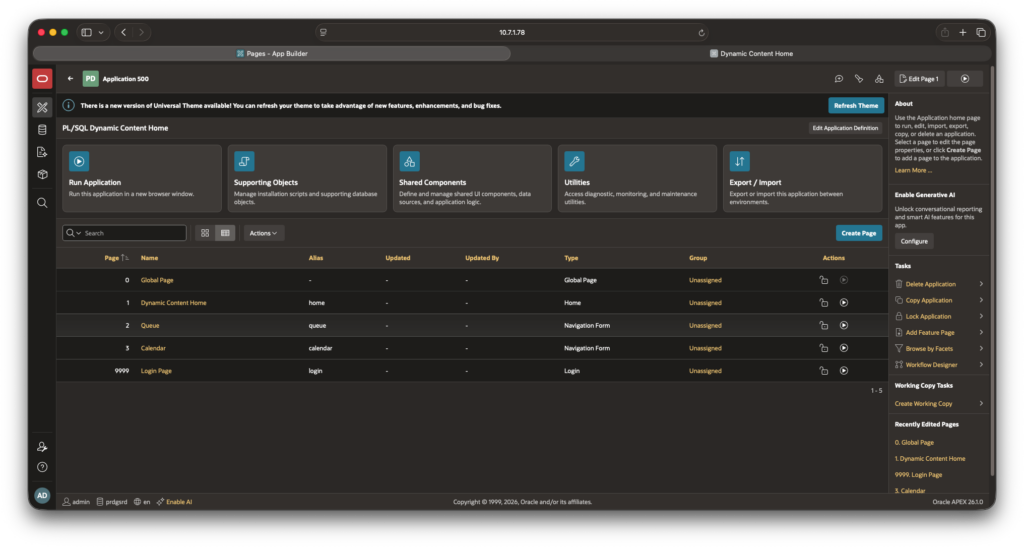
The manual Builder implementation is short. Create the package from the supporting SQL script, create page 1 as the application home page, add a PL/SQL Dynamic Content region, and set the region source to:
return apxdemo_dynamic_home_ui.render_home();
After that, create the destination pages used by the generated links and run the application. The full step-by-step version is in the demo project documentation.
Final rule
The reason I still like this feature is that it gives me a controlled place to do something unusual without pretending every unusual screen should be solved by stretching standard regions past their natural shape.
For me, the maintenance rule is simple: use PL/SQL Dynamic Content when the page really needs a custom composition, keep the page-level PL/SQL small, generate APEX links with APEX APIs, escape output, and document the contract. When the page stops being an exception and starts becoming a repeated pattern, that is the moment to move the repeated pieces back into a more maintainable structure.
You can find the full demo application, PL/SQL package, manual import file, and setup notes in the GitHub repository: denioflavio/apex-plsql-dynamic-content-home.

One Comment