
From Social Login to API Access: Building a Self-Service OAuth Client Flow with APEX and ORDS
In APEX, the usual paths are familiar: workspace users, database accounts, or some internal authentication model we control ourselves. But APEX also gives us Social Sign-In, and that changes the tone of the application completely. There are several ways to do that depending on the provider, but in this case I am using Google because it keeps the demo simple and close to a real self-service scenario. The moment you let a user come in through a social identity provider, you are already much closer to the kind of onboarding flow a product needs. And that is usually where the next problem shows up. In this kind of flow, it is common for those same users to also need access to ORDS endpoints as API consumers, and that access cannot stay loose or anonymous if you want the platform to behave like a real product. At that point, authentication is not just a security checkbox anymore. It becomes part of how you manage access, trace usage, and, in many cases, even support billing or service boundaries.
Getting a user through Google Social Sign-In in APEX is fine. Clean, fast, almost boring. The mess starts when that same user is supposed to become an API consumer without somebody in the back office creating accounts, generating credentials, emailing secrets around, or opening SQL Developer to patch what the UI did not finish.
That was the real shape of the problem here.
I got pulled into a SaaS transition where the application needed to stop behaving like a gated internal system and start behaving like a product. That changes the bar. The end user cannot just authenticate. The end user needs to self-register, finish the bits Google does not know, and leave the flow holding a valid client_credentials pair that works against a protected API.
That is the hole this demo tries to fill.
I did not want this case to stop at screenshots and narrative. The full project is available in GitHub, and it is structured so you can inspect the flow end to end instead of guessing what is happening behind the UI. The repository includes the APEX application assets, the SQL scripts to create the tables and packages, the ORDS REST setup, Postman material for validation, helper tooling for local SQLcl execution, and the documentation that walks through the Google setup, the APEX configuration, the curl tests, and the known limits of the lab. In other words, this is not just “a blog demo.” It is the actual lab, with the moving parts exposed.
What I like about the repo structure is that it mirrors the story of the case pretty well. You can start from the overview doc, run the SQL scripts in sequence, build the APEX app, configure Google, validate the token flow, and hit the protected GET /api/v1/me endpoint with either curl or Postman. The core design choices are also explicit there: google_sub as the stable identity key, custom application tables instead of leaning on workspace users, a single active ORDS OAuth client per app user, one-time secret display, and defensive endpoint resolution with runtime diagnostics. That makes the repository useful not only as sample code, but also as a reference implementation for this exact pattern.
If you want to inspect the implementation directly, the project is here: https://github.com/denioflavio/apex-auth-lab-google-ords. The repository description is accurate and pleasantly blunt: this is a practical Oracle APEX + ORDS demo focused on Google Social Sign-In, self-service profile completion, and automatic provisioning of OAuth2 client credentials for secure API access.
What this lab actually builds
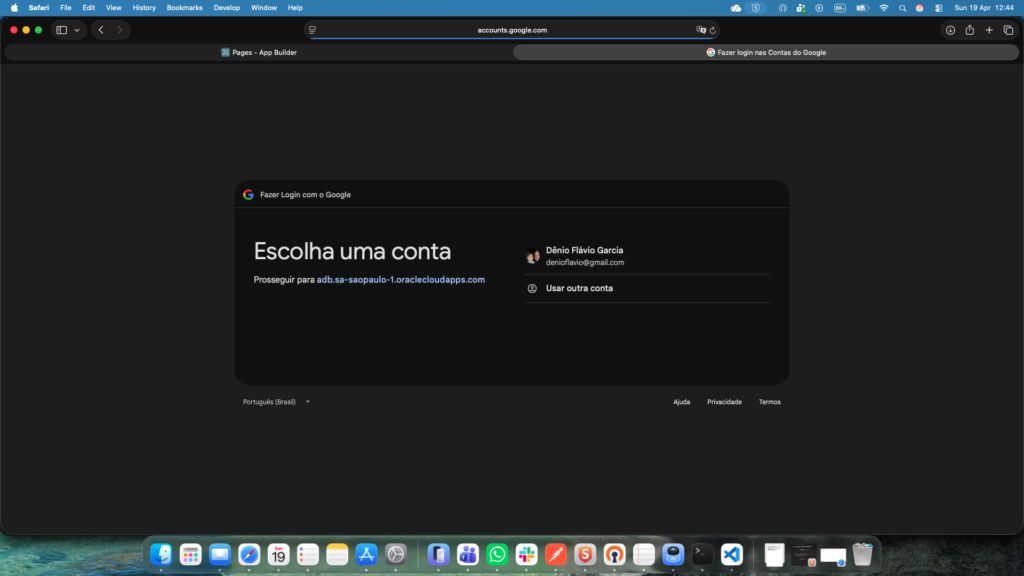
The user signs in with Google. APEX gets a stable identity. The app then asks for the extra data Google does not know and still should not guess. Once that profile is complete, the application provisions an ORDS OAuth client inside the flow itself. Not later, not by ticket, not by operator. Right there. Then the user leaves the onboarding path with credentials that can immediately call a protected endpoint.
That endpoint is intentionally tiny: GET /api/v1/me.
Not because /me is exciting. Because it proves the one thing that matters in a lab like this: the token issued through that client can be resolved back to the right application user.
That is the whole chain:
- Google proves identity
- APEX controls the sign-in and navigation
- the application still owns its own user model
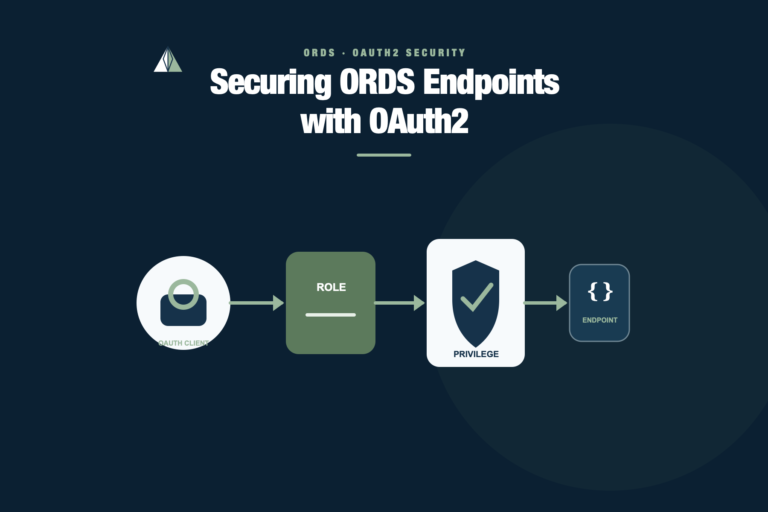
- ORDS provisions the API client and protects the endpoint
/meproves the flow actually closes
That is what is being built here.
Social login is not onboarding
Social login solves identity proofing at the front door. It does not solve application onboarding.
That distinction matters more than people admit. A Google account gives you a stable subject, an email, maybe a display name. It does not tell your app whether the user accepted your registration model, what extra fields you need, whether the user should become an API client, or how that client should exist on the ORDS side.
That is why I kept the second step in the flow on purpose: complete the profile, then provision the ORDS client inside the app.
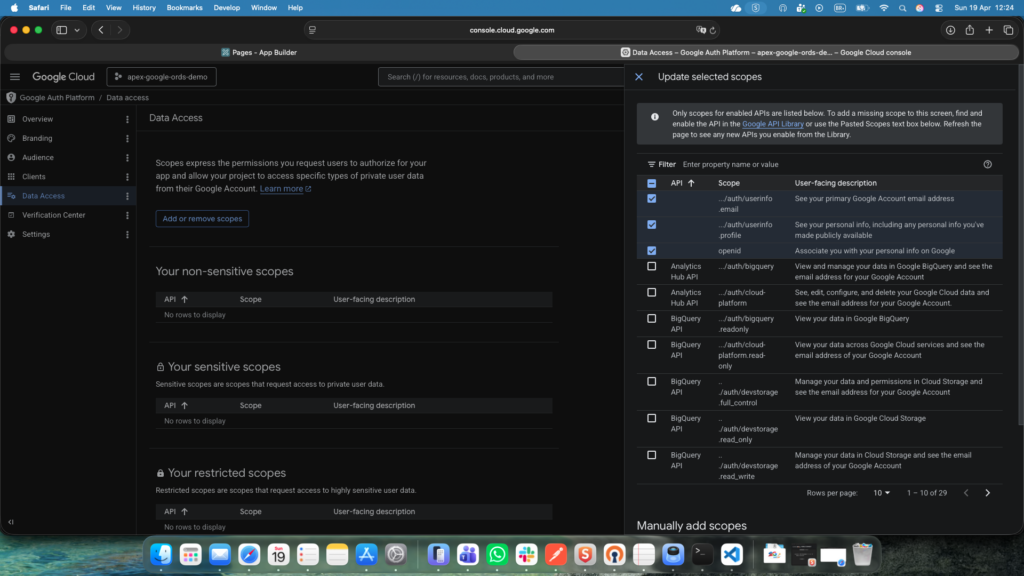
The Google side is the first place where this flow likes to become annoying. One bad redirect URI and the whole thing looks broken before you even reach APEX.
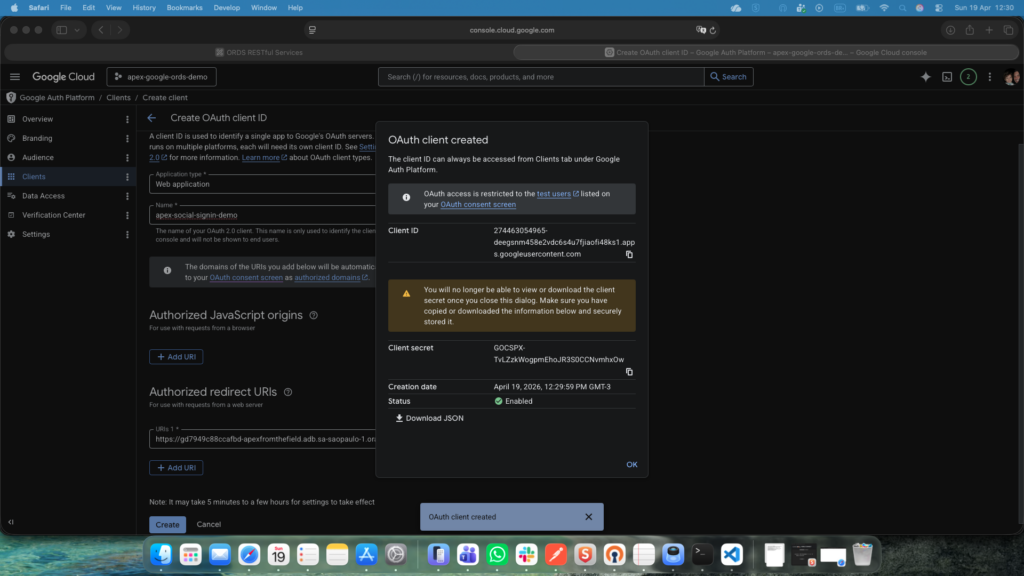
The redirect URI setup is dull work, but it is exactly the kind of dull work that burns half a morning when it is off by a little.
I did not try to be clever with scopes either. openid, email, profile. That is enough for a lab like this. Anything beyond that would add ceremony before it adds value.
APEX needs to stay honest here
One thing I did not want in this case was fake elegance. No giant orchestration layer. No custom token server pretending to help. No pile of tables trying to look enterprise.
APEX already knows how to work with Google Social Sign-In. ORDS already knows how to issue OAuth2 client_credentials. The useful job was stitching those parts together without hiding where the sharp edges are.
On the APEX side, the authentication scheme stays small: stable identity from Google, a couple of mapped attributes, and nothing more.
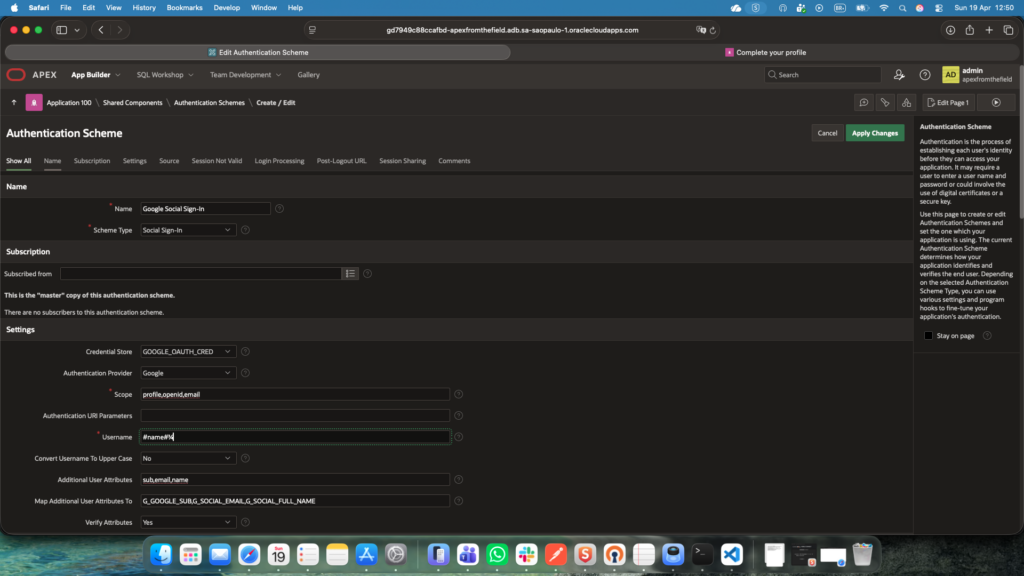
The important bit is not “Google works.” The important bit is choosing which claims are actually part of your app model.
I used google_sub as the real identity anchor and treated email as support data, not as the primary key wearing a fake moustache. That is one of those choices that barely gets a line in documentation and then saves you pain later when email changes, aliases show up, or somebody wants to be clever with account linking.
The post-login hook also stayed intentionally thin.
Post-login is a good place to route and enrich session state. It is a bad place to start building spaghetti logic.
All it really needs to do is take the authenticated session, resolve whether this Google user already exists in the app, and send the flow to the right page. New user: finish the profile. Existing user: show what already exists. That is enough.
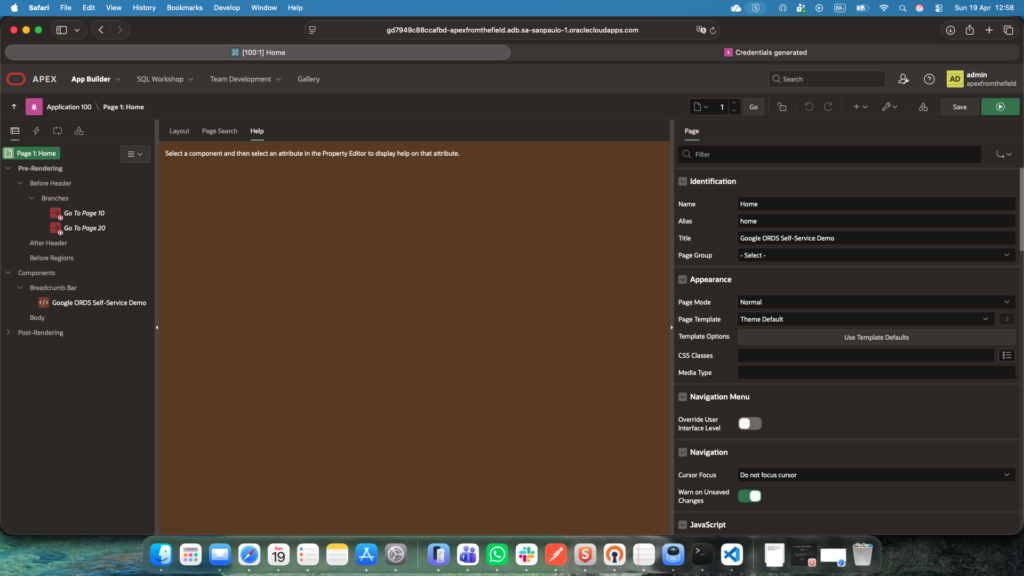
The useful move is provisioning the ORDS client inside the app
Plenty of demos stop right after “social login succeeded.” In a real SaaS-ish scenario, that is not enough. If the platform is going to expose protected APIs, somebody has to issue an API client. If you keep that step manual, you kept the bottleneck. You just put a nicer login page in front of it.
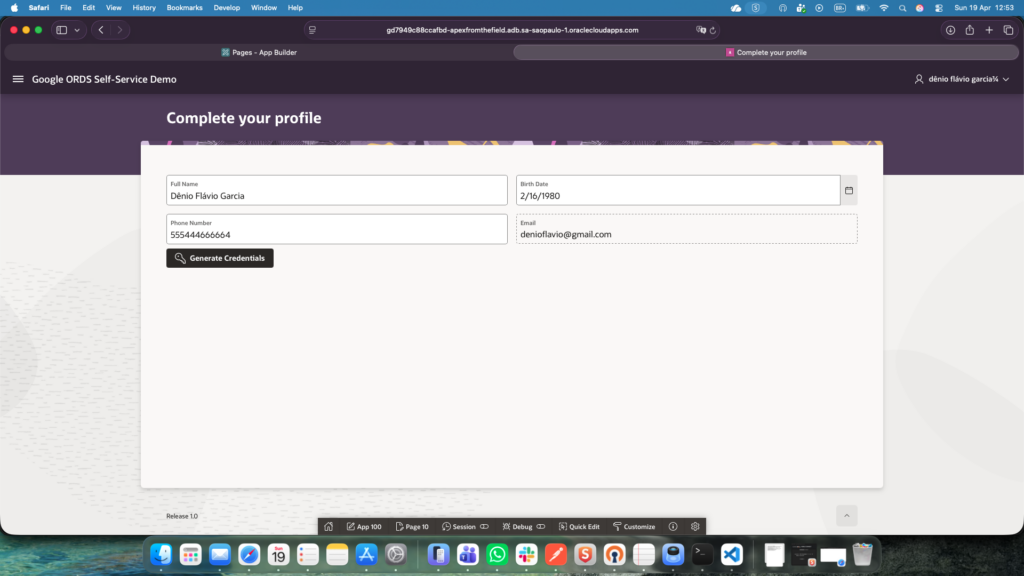
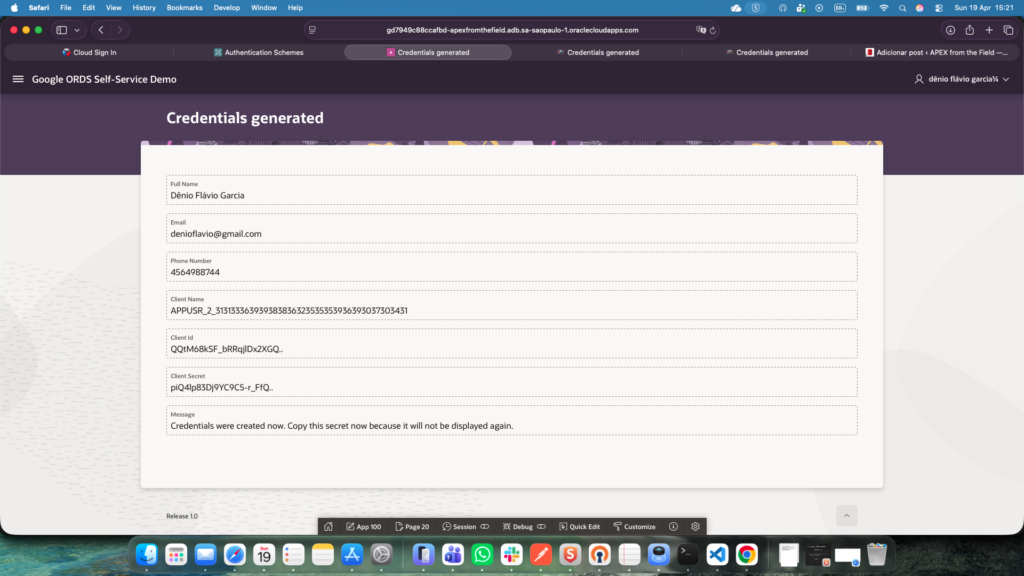
So the registration page does the obvious hard thing: once the minimal profile is complete, it calls PL/SQL that provisions the ORDS OAuth client, grants the right role, persists the link back to the application user, and returns the credentials to the screen exactly once.
After user clicks Generate Credentials, the SUBMIT_PROCESS invokes the API that creates client credentials:
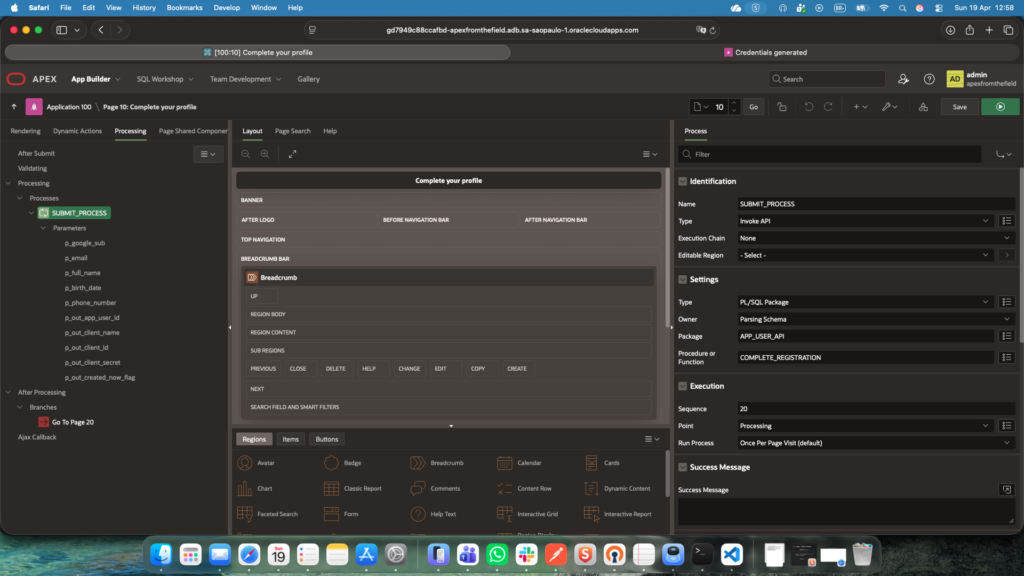
This is the flow I wanted: profile data in, ORDS client out, no human approval queue hiding behind the curtain.
That decision came straight from the original problem, the user needed independence. If the application is being turned into a product, forcing an operator to create every API client by hand is just another version of the old internal model.
I also kept the rule set boring on purpose:
- one app user can have at most one active ORDS client
- first registration generates the credentials
- later visits reuse the existing client
- secret is shown only at creation time
That is not because rotation, revocation, or re-issuance do not matter. They do. They just belong in the next layer of the story, not in the first lab someone is trying to understand.
Keep the API demo embarrassingly small
Once the client exists, the easiest way to wreck the demo is to add domain logic just because the token flow already works and I did not want that.
GET /api/v1/me is almost aggressively small, and that is exactly why it works as a demo. It proves the one thing that matters here: the token presented to ORDS can be resolved back to the right application user.
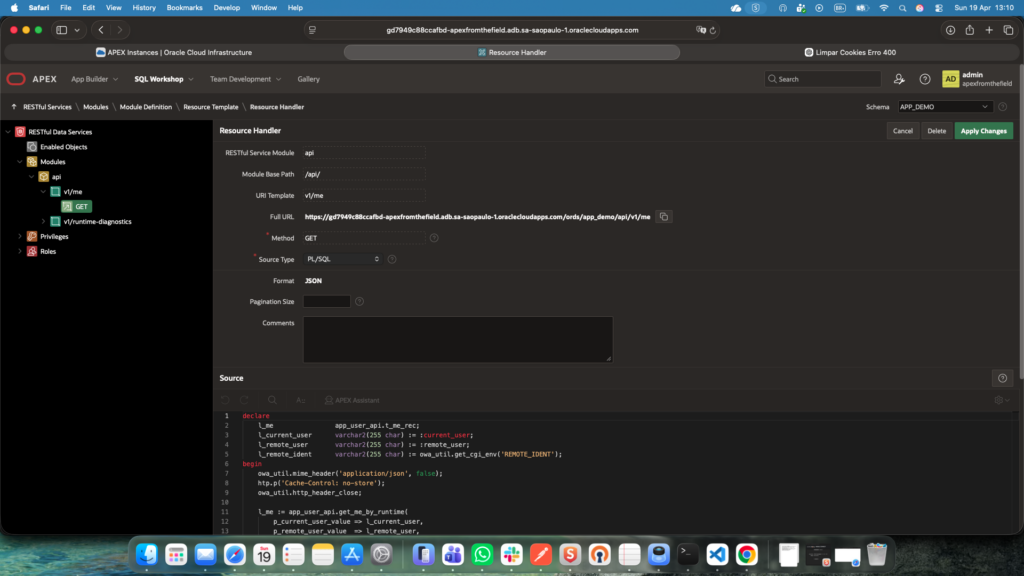
The endpoint is intentionally tiny, the real point is that it is protected and tied back to the provisioned client.
There is a second field detail here that is easy to gloss over: identity propagation in client_credentials flows is not the kind of thing I like to trust blindly just because a package spec looks friendly. Runtime can be subtle. In this environment, ORDS ended up surfacing the client identity consistently enough to resolve the user. I still built the lookup defensively and kept runtime diagnostics in the lab, because this is exactly the sort of assumption that looks solid until the first environment change.
That is one of the reasons I like /me as the demo endpoint. It makes the runtime behavior visible fast. No business object noise. No fake payload inflation. Just, “did this token resolve to the right client or not?”
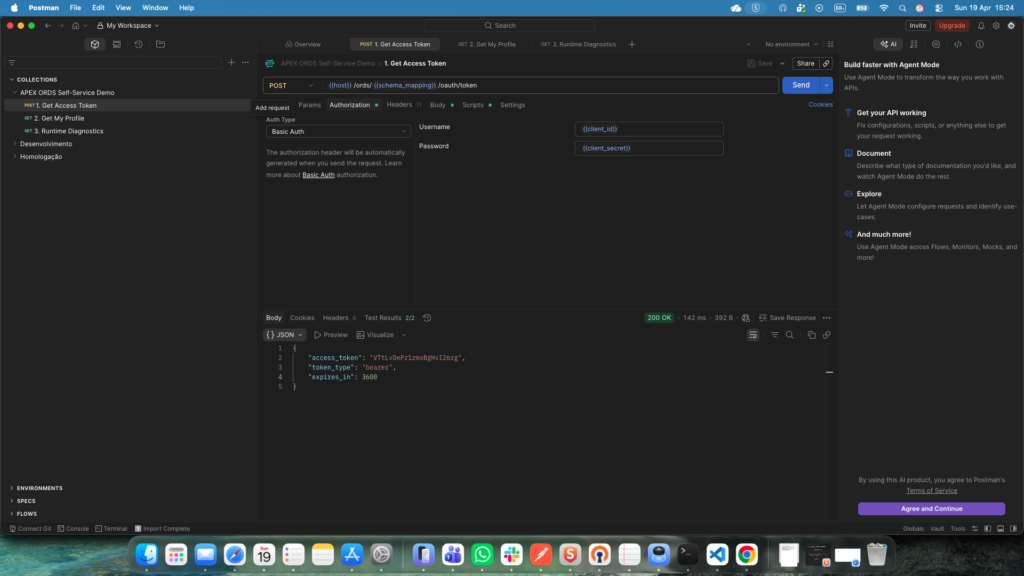
And once it works, the proof is satisfyingly plain.
Bearer token in, the client’s own data back out. Nothing fancy, which is exactly the point.
Where this kind of flow usually bends
This lab stayed small, but it did not stay naive. The delicate part is not one single technology, it is the handoff between them.
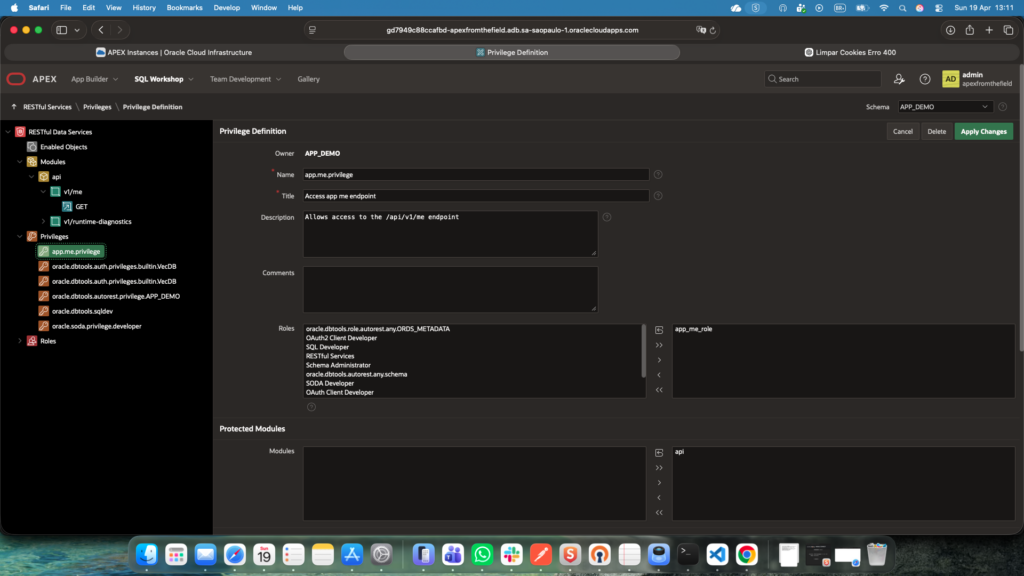
Google Cloud wants the callback exactly right and APEX wants claim mapping to be explicit. Your app model still needs its own user table and rules. ORDS wants roles, privileges, and a client that really exists. The runtime identity you expect from client_credentials still has to be validated in the real environment.
That cross-stack fragility is the bit people underestimate. Not because any one piece is especially exotic, but because the failure modes are distributed. One mismatch in Google, one careless mapping in APEX, one sloppy lookup in PL/SQL, and you get a flow that is technically “built” and still feels broken.
Even logout was a reminder of that. I hit the classic awkward version: the session was ending, but the post-logout behavior made the app feel wrong. Not a security disaster, just one more example of how auth flows get ugly in the seams instead of in the headline feature.
What I simplified, and what I would harden next
The simplifications were deliberate here, I wanted the reader to be able to follow the flow without drowning in tenant models, approval chains, secret rotation screens, or a wall of JavaScript that has no business being in this story. The case stays readable because it focuses on one clean path: identify the user, collect the minimum extra data, issue the client, prove the client can call a protected endpoint.
In production, I would harden at least these points:
- secret rotation and explicit re-issuance flows
- client revocation and lifecycle status beyond a single active flag
- stronger audit around client creation and API usage
- clearer operational separation between demo messaging and security messaging
- rate limiting and abuse controls on the token and API endpoints
- a better strategy for logout UX across APEX and the identity provider
- tenant and authorization rules that go beyond “this client belongs to this user”
None of that invalidates the lab. It just means the lab knows where it stops.
Why this pattern is worth keeping around
What I like about this shape is that it scales into real use cases without pretending to be a platform on day one.
It is easy to picture where it goes next:
- partner onboarding where each partner team gets its own client
- B2B integrations where a user signs in, finishes onboarding, and immediately receives usable API access
- internal platforms that need to stop treating API access as a ticket-based manual process
That is the real value in it. Not “look, Google login works in APEX.” That part is old news. The useful bit is turning that front-door identity into a self-service API consumer without dropping into manual ops halfway through.
That was the original pain, and it is still the reason the case holds up.
PS: The API keys shown in the images have already been properly rotated 😉

One Comment