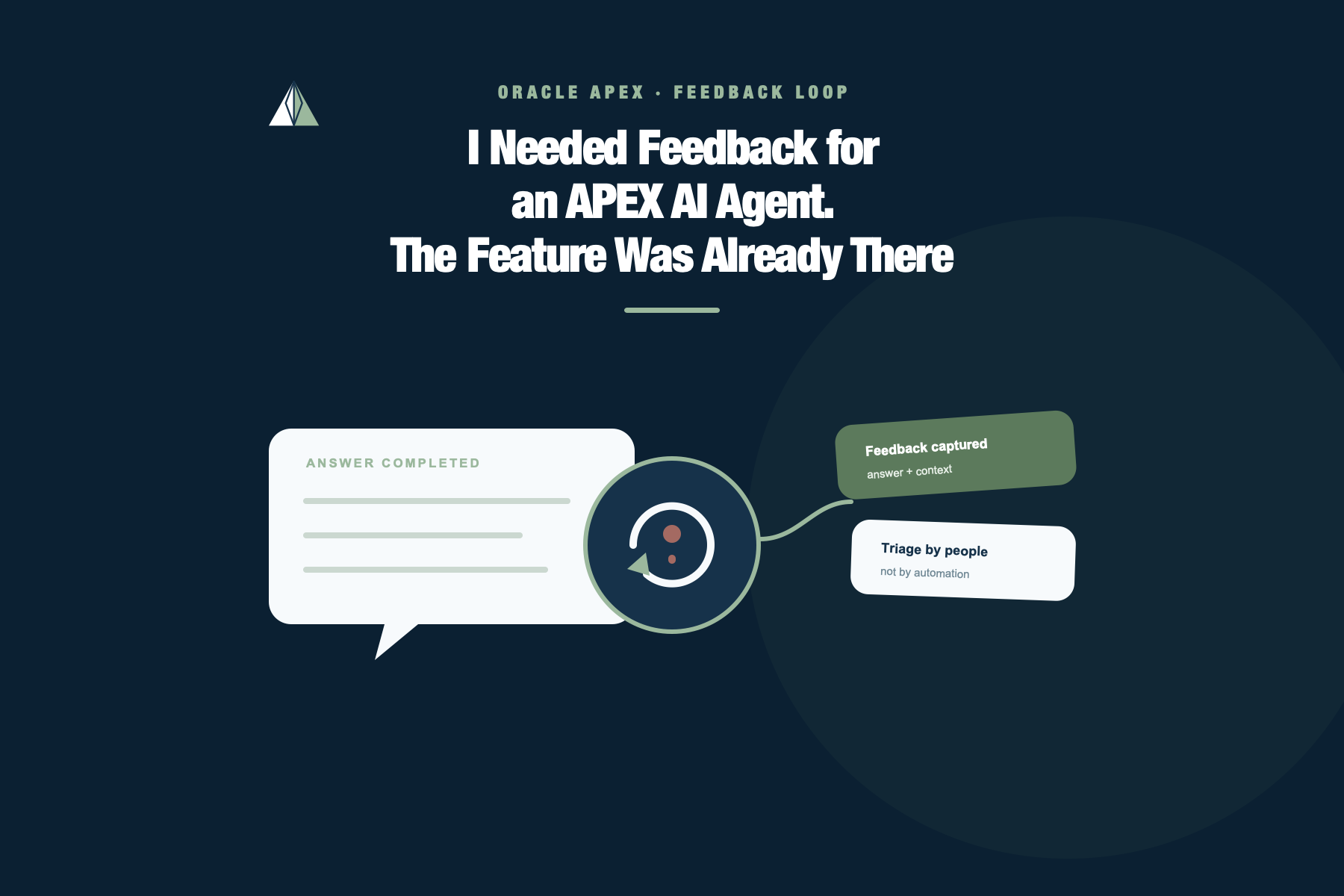
I Needed Feedback for an APEX AI Agent. The Feature Was Already There
User feedback has a bad reputation among developers. It arrives without reproduction steps. It calls an unclear label a bug and a business-rule disagreement a system failure. Sometimes it appears in a meeting three weeks after the user quietly found another way to finish the work.
It is tempting to treat feedback as a necessary evil. But silence is worse.
This case was inspired by a problem I needed to address professionally: once users started interacting with AI-generated answers inside an application, how could the team capture the moment when an answer looked plausible, the request completed successfully, but the result was still wrong or unhelpful?
The application in this post is a deliberately simplified demonstration of that problem. I changed the business domain and built a fictional travel expense assistant so I could reproduce the pattern without describing the internal application, data, or rules behind the original need.
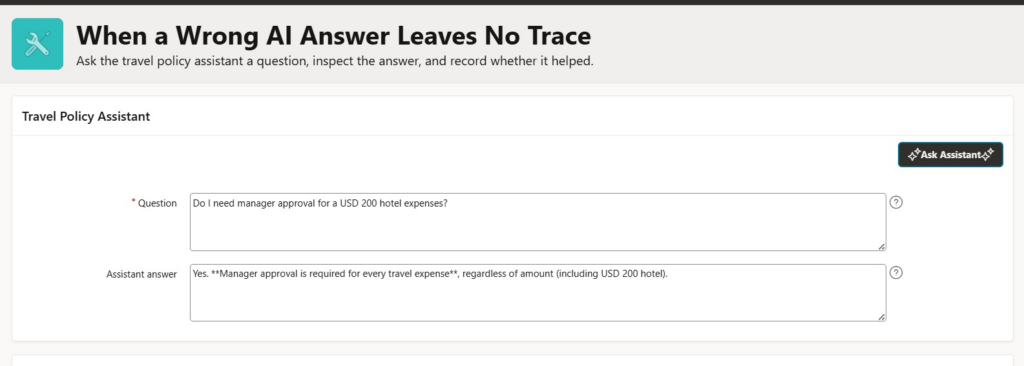
The demo page is deliberately small. The user enters a question, clicks a button, and the answer appears below it.
One of my test questions was:
Do I need a manager approval for USD 200 hotel expenses?
The Agent returned an answer. The Dynamic Action completed, and no exception appeared. From the application’s point of view, everything worked.
The answer was wrong.
That was the uncomfortable part of the test. A traditional application failure usually leaves something behind: an Oracle error, a failed validation, an unexpected HTTP status, or at least a useful debug message. This interaction left none of those things because the request itself had succeeded.
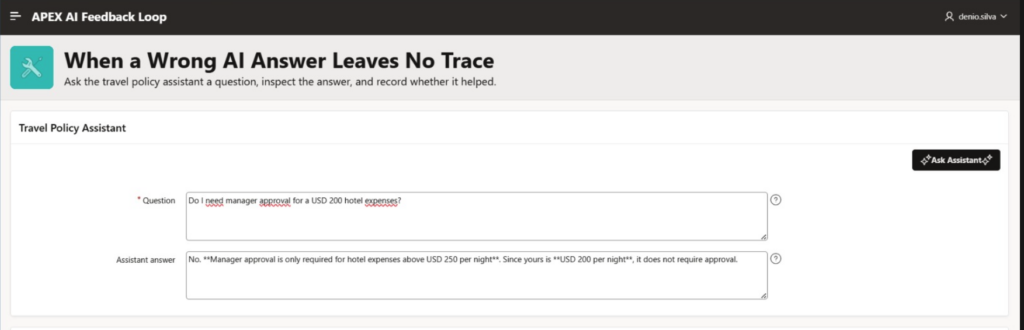
If a real user received an answer like that, noticed the mistake, and quietly completed the task another way, I might never know.
So I added feedback beside the answer.
Not because APEX has a special AI feedback engine. It does not. Then I used the regular APEX feedback infrastructure because it already solved the less glamorous part of the problem: receiving a comment, keeping application and page context, assigning a status, recording a response, and giving the development team somewhere to manage the entry.
The AI context was something I added on top.

APEX feedback is not an AI feature
APEX_UTIL.SUBMIT_FEEDBACK was not created to train models, evaluate prompts, or improve AI Agents. It is a general application feedback API. APEX applications can use it to collect comments, enhancement requests, and bugs from users.
That makes it useful in plenty of ordinary situations:
- a user cannot find the action that completes a business process;
- a report total does not match what the finance team expected;
- a mobile layout makes an important field difficult to use;
- an approval screen does not explain why a request is blocked;
- users keep asking for the same filter or export option;
- a label makes sense to developers but not to the people doing the work;
- an integration completed successfully but produced a surprising business result.
None of these cases involves AI. They all have the same underlying need: let the user report what happened while the application still knows where they are.
My demo chat page was simply another instance of that problem.
What I needed to preserve
A rating by itself would not help much.
If the team only receives “Bad answer,” the first triage meeting will begin with questions nobody can answer. Which question? Which response? Which version of the Agent? Was the user on the expected page? Did the problem happen before or after the prompt changed?
For this application, I decided to keep:
| Feedback field | Value stored |
|---|---|
| Comment | The user’s explanation |
| Rating | Good, neutral, or bad |
| Application and page | Supplied by the APEX feedback context |
| Attribute 1 | Feature name |
| Attribute 2 | User prompt |
| Attribute 3 | Generated response |
| Attribute 4 | AI Agent static ID |
| Attribute 5 | Prompt or policy version |
The page had four relevant items:
| Item | Purpose |
|---|---|
P1_PROMPT | The user’s question |
P1_AI_RESPONSE | The generated answer |
P1_AI_RATING | GOOD, NEUTRAL, or BAD |
P1_AI_FEEDBACK | The user’s optional explanation |
I placed the rating and comment directly below the answer. That location was important. Asking the user to open another page and reconstruct the interaction later would throw away most of the context I wanted to capture.
Submitting the feedback
The application uses APEX_UTIL.SUBMIT_FEEDBACK:
begin
   if not apex_util.feedback_enabled then
      raise_application_error(
         -20001,
         'Feedback is not enabled for this application.'
      );
   end if;

   apex_util.submit_feedback(
      p_comment        => :P1_AI_FEEDBACK,
      p_type           => 1,
      p_rating         => case :P1_AI_RATING
                            when 'GOOD' then 3
                            when 'NEUTRAL' then 2
                            when 'BAD' then 1
                         end,
      p_application_id => :APP_ID,
      p_page_id        => :APP_PAGE_ID,
      p_attribute_01   => 'Travel Policy Assistant',
      p_label_01       => 'Feature',
      p_attribute_02   => substr(:P1_PROMPT, 1, 4000),
      p_label_02       => 'Prompt',
      p_attribute_03   => substr(:P1_AI_RESPONSE, 1, 4000),
      p_label_03       => 'Response',
      p_attribute_04   => 'travel_policy_assistant',
      p_label_04       => 'Agent Static ID',
      p_attribute_05   => 'travel_policy_v1',
      p_label_05       => 'Prompt Version'
   );
end;I used feedback type 1, General Comment, when the entry was created.
It would be tempting to classify every bad rating as a bug immediately, but the user has reported a symptom, not its cause. The answer may be wrong because of an outdated policy, missing context, an ambiguous question, retrieval behavior, or a genuine defect in an AI Tool. I prefer to classify it during triage.
The rating values are:
3for good;2for neutral;1for bad.
At this point, the application has not learned anything. It has recorded evidence.
What triage looks like
APEX stores the entries in its feedback repository. Developers can manage them through Team Development, or query the public APEX_TEAM_FEEDBACK view when they need a custom report.
For the demo, I added a Feedback Triage page to the application. It is a read-only Interactive Report over APEX_TEAM_FEEDBACK. The page is not meant to replace Team Development. It gives the application team a focused view of the fields that matter for this case: rating, prompt, answer, Agent, policy version, tags, and developer decision.
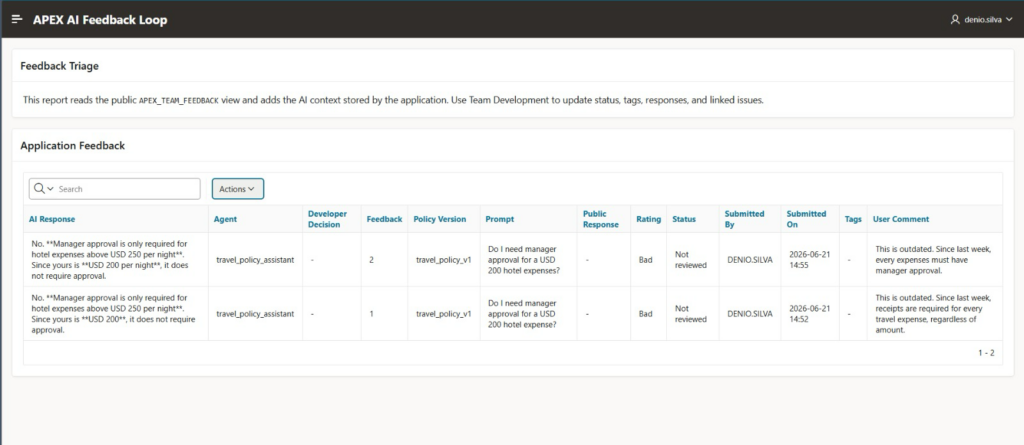
For this application, a triage query can recover both the standard feedback fields and the AI context stored in the custom attributes:
select feedback_id,
       feedback_number,
       created_on,
       logging_apex_user,
       feedback_status,
       feedback_rating,
       feedback             as user_comment,
       attribute_01         as feature_name,
       attribute_02         as user_prompt,
       attribute_03         as ai_response,
       attribute_04         as agent_static_id,
       attribute_05         as prompt_version,
       tags,
       developer_comment,
       public_response,
       logged_as_issue_id,
       updated_by,
       updated_on
  from apex_team_feedback
 where application_id = :APP_ID
order by created_on desc;APEX 26.1 provides these feedback states:
| Status | How I use it |
|---|---|
| No status | The entry has not been reviewed |
| Acknowledged | Someone has performed the first review |
| Additional information requested | The team needs more context from the user |
| Open, processing feedback | The problem was accepted for investigation or correction |
| Closed | The team reached a decision and recorded the outcome |
Closed does not tell me whether the suggestion was implemented, rejected, or identified as a duplicate. I use tags and the developer comment to preserve that distinction.
For example:
| Decision | Status | Suggested tags |
|---|---|---|
| Confirmed and being corrected | Open | AI;CONFIRMED |
| More context required | Additional information requested | AI;NEEDS_INFO |
| Correction released | Closed | AI;IMPLEMENTED |
| Answer was consistent with the approved policy | Closed | AI;REJECTED |
| Same cause as another entry | Closed | AI;DUPLICATE |
This is not sophisticated ticket management, but it is enough to stop feedback from becoming a pile of comments nobody owns.
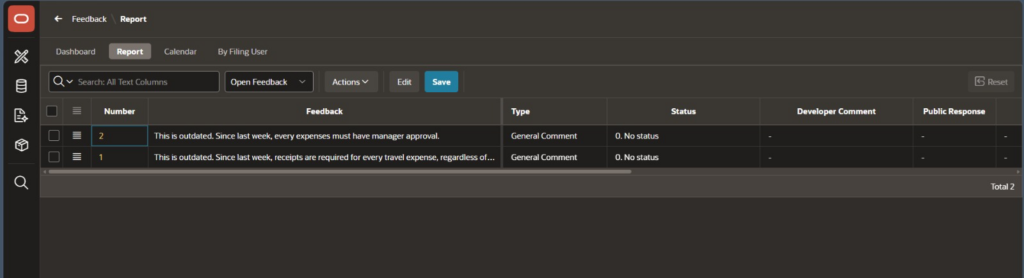
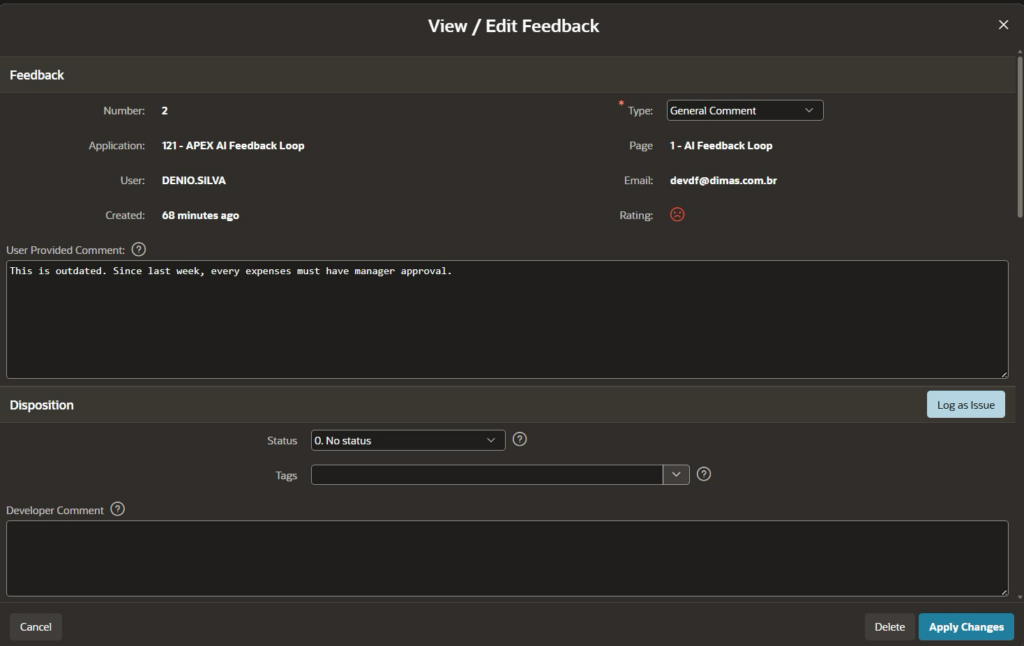
The same update can be made programmatically with APEX_UTIL.REPLY_TO_FEEDBACK. For example, after confirming the outdated policy:
begin
   apex_util.reply_to_feedback(
      p_feedback_id       => :P10_FEEDBACK_ID,
      p_type              => 3,
      p_status            => 3,
      p_tags              => 'AI;CONFIRMED;TRAVEL_POLICY',
      p_developer_comment => 'Reproduced with travel_policy_v1. '
                             || 'The Agent used an outdated receipt rule.',
      p_public_response   => 'We confirmed the problem and are updating the policy.',
      p_followup          => null
   );
end;Here, type 3 classifies the entry as a bug and status 3 marks it as open and under review. I make that classification after reproducing the problem, not when the user first submits the rating.
Following one bad answer through the loop
Suppose the Agent answers:
No. Manager approval is required for USD 250 hotel expenses or more.
The user selects Bad and writes:
This rule is outdated. Manager approval is now required for every travel expense.
The entry arrives with no status. I can open it in Team Development under Feedback, or in a feedback report inside the application. During triage, I inspect the original question, the response, the Agent static ID, and travel_policy_v1.
Then I check the source of the rule.
In the small demo application, the policy is part of the Agent’s system prompt. The problem is easy to reproduce: the prompt contains the old manager approval.
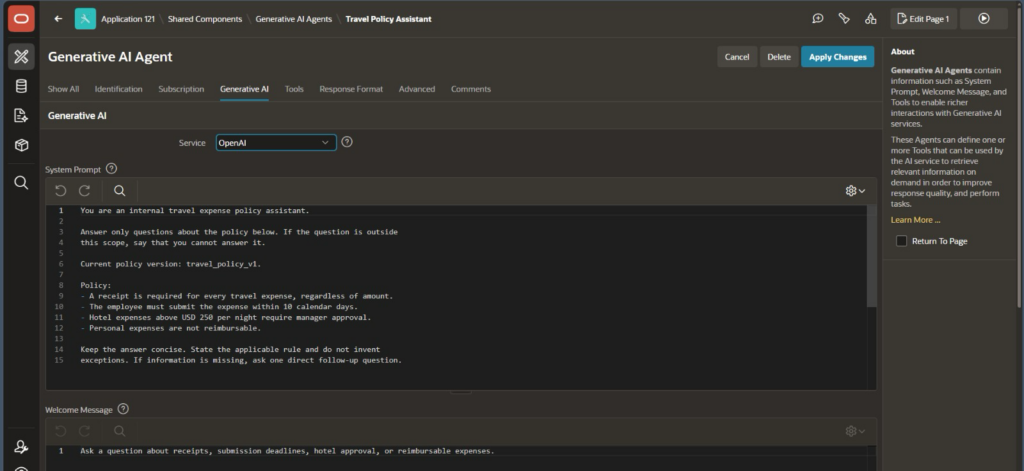
I mark the entry as Open, tag it AI;CONFIRMED, and add a developer comment:
Reproduced with travel_policy_v1. The Agent is using an outdated receipt rule.
The correction changes the policy context to:
Current policy version: travel_policy_v2.

Every expenses requires manager approval.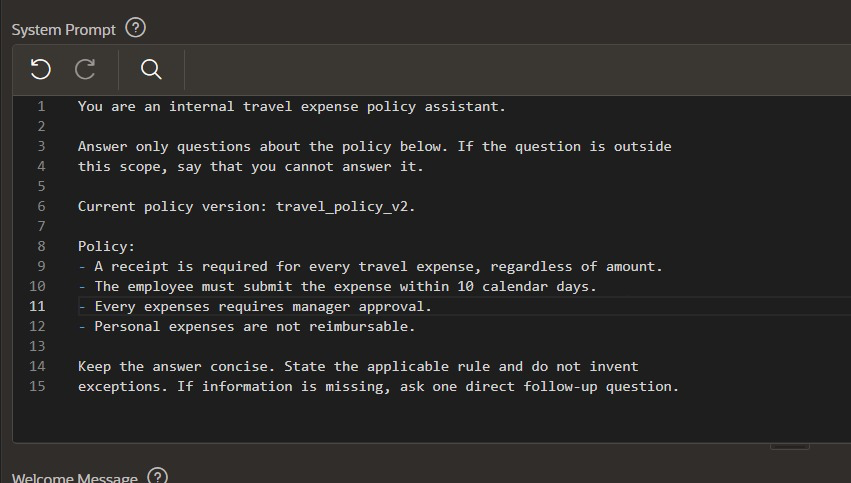
I repeat the original question before closing the feedback.
The new answer should now say:
Yes. Under travel_policy_v2, a receipt is required for every travel expense, regardless of amount.
After that test, I close the entry with the tag AI;IMPLEMENTED and record what changed.
That is how the feedback was internalized in this case.
The model was not retrained. The feedback did not flow directly into the prompt. A human reviewed the report, confirmed the cause, changed the approved context, and tested the same interaction again.
Why I would not automate that last step
Automatically feeding user comments back into an Agent sounds attractive until the first incorrect or malicious comment arrives.
A feedback entry may contain:
- a misunderstanding of the business rule;
- a valid exception that applies only to one department;
- confidential information;
- prompt injection;
- two requests that contradict each other.
Raw feedback is evidence, not approved knowledge.
The safe path is:
- capture the report;
- review the interaction;
- verify the business rule;
- decide whether a change is needed;
- update the controlled source;
- repeat the original test;
- record the outcome.
For a production application, I would probably move the travel policy out of the system prompt entirely. An AI Tool could retrieve the active policy from a versioned table or a PL/SQL API. The triage loop would remain the same, but the correction would happen in the governed source instead of the prompt.
Feedback is not observability
I would also keep feedback separate from a full AI audit trail.
The APEX feedback repository is useful for the user’s judgment and the team’s response. It is not where I would store conversation replay, token usage, model parameters, latency, tool calls, retrieved documents, or complete provider payloads.
Those details belong in application tables designed for AI execution logs, with a deliberate retention and security policy.
The feedback entry answers a narrower question:
What did the user think about this result, and what should the team investigate?
For this application, that was the missing signal.
The AI request had succeeded and the answer had failed. A generic APEX feature gave me a structured way to preserve the difference.
The complete APEXLang application used in this case is available on GitHub at denioflavio/apex-ai-feedback-loop. The repository includes the AI Agent, feedback submission flow, triage report, and the application source required to reproduce the experiment in Oracle APEX 26.1.