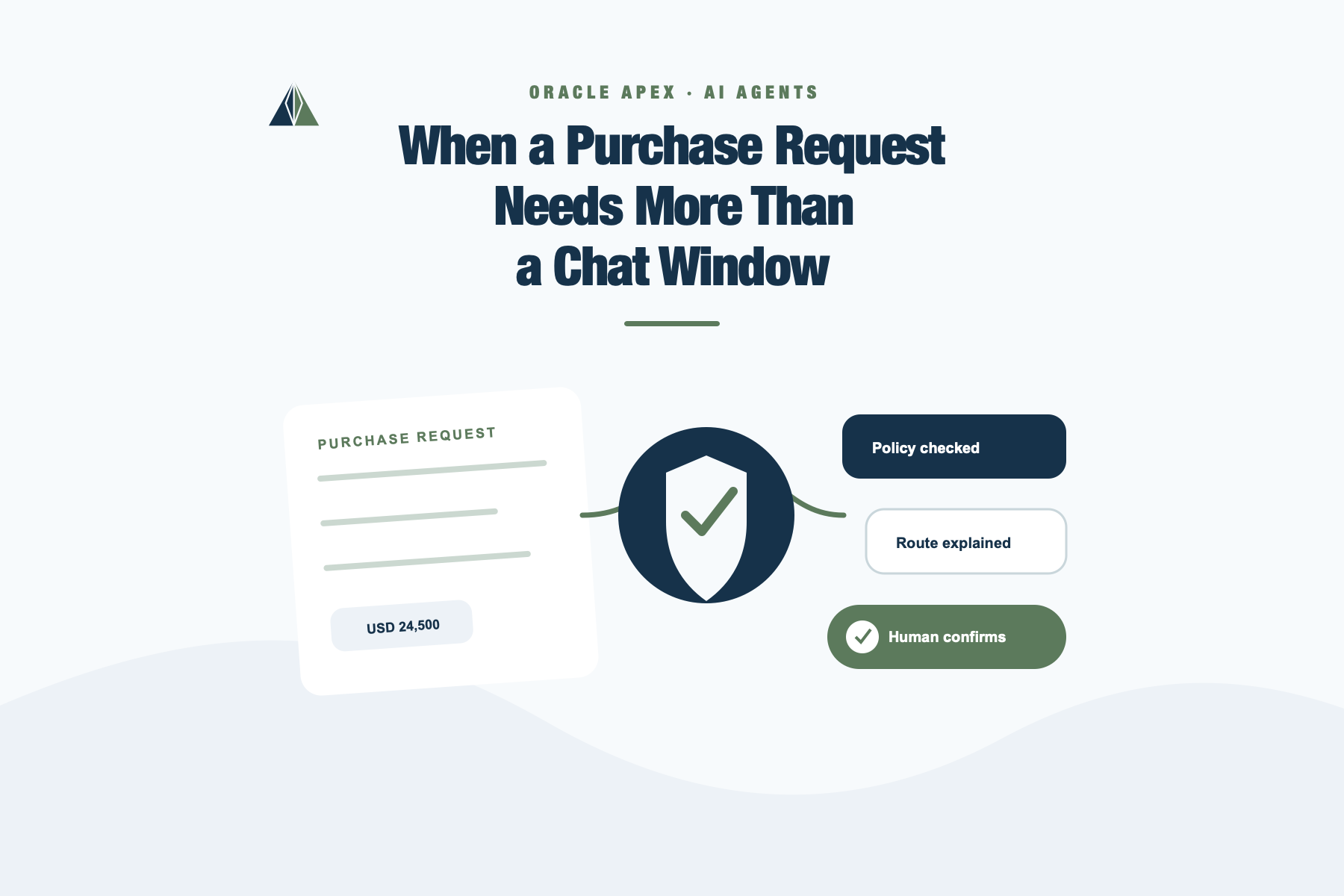
When a Purchase Request Needs More Than a Chat Window
I had been waiting for my Oracle APEX environment on OCI to be updated to version 26. This week it finally happened. So, to celebrate properly, I decided to build a small field-style demo around one of the features that immediately caught my attention in this release: native AI Agents in Oracle APEX.
The interesting part, for me, is not just putting a chat window inside an application. We have all seen enough chat demos by now. The more useful question is what happens when the assistant is placed inside a real business flow, where the data has meaning, the rules already exist, and some actions should never happen without human confirmation.
Procurement approval is a good example because it is painfully common in companies. Someone creates a purchase request, the request needs policy checks, the approval route depends on amount, department, vendor risk, and category, and the user often does not know what to do next. The application may have all the information, but the usability problem remains: the user needs to open several pages, understand the policy language, infer the next step, and decide whether it is safe to submit, approve, reject, or ask for changes.
That is where an AI Agent can help. Not by replacing the rules, and definitely not by letting the model invent procurement policy, but by making the existing application easier to use. The agent can understand a natural-language question, retrieve controlled context, call deterministic PL/SQL logic, explain what it found, and only execute sensitive actions after explicit confirmation.
That was the goal of this experiment.
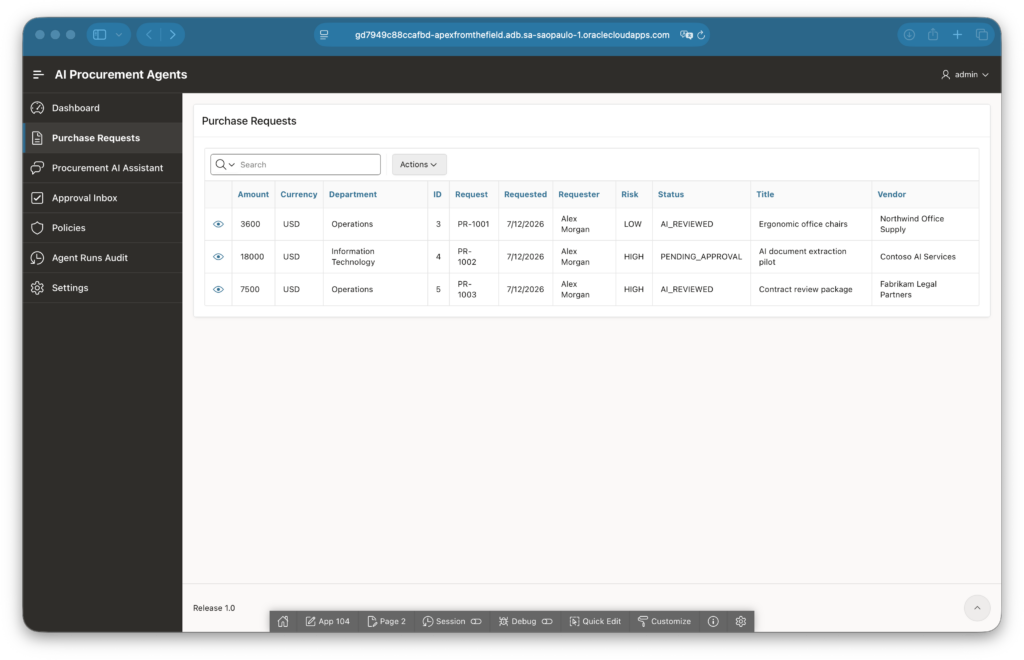
A simple procurement application with requests in different states. The agent is useful because the same screen can hide very different next actions.
The Flow I Wanted To Prove
The demo application is called AI Procurement Agents. It is intentionally small, but it has enough structure to behave like a real enterprise flow:
- purchase requests with amount, department, requester, vendor, risk, and status;
- procurement policies stored in database tables;
- deterministic PL/SQL packages for policy evaluation and workflow transitions;
- approval steps generated from the request context;
- an APEX AI Agent exposed through the native assistant experience;
- AI Tools that retrieve data, evaluate policies, calculate routes, and submit requests;
- audit tables for agent runs, messages, tool calls, and recommendations.
The important design choice is that the model does not own the business rules. The Oracle Database does.
The agent is allowed to ask the application for context. It is allowed to call a policy tool. It is allowed to ask for the approval route. It is even allowed to submit a request, but only through a controlled tool, and only after APEX asks the user for confirmation.
That boundary is what makes the feature interesting for enterprise APEX applications. The agent is not a separate automation layer floating outside the app. It is part of the application surface, using application-defined tools.
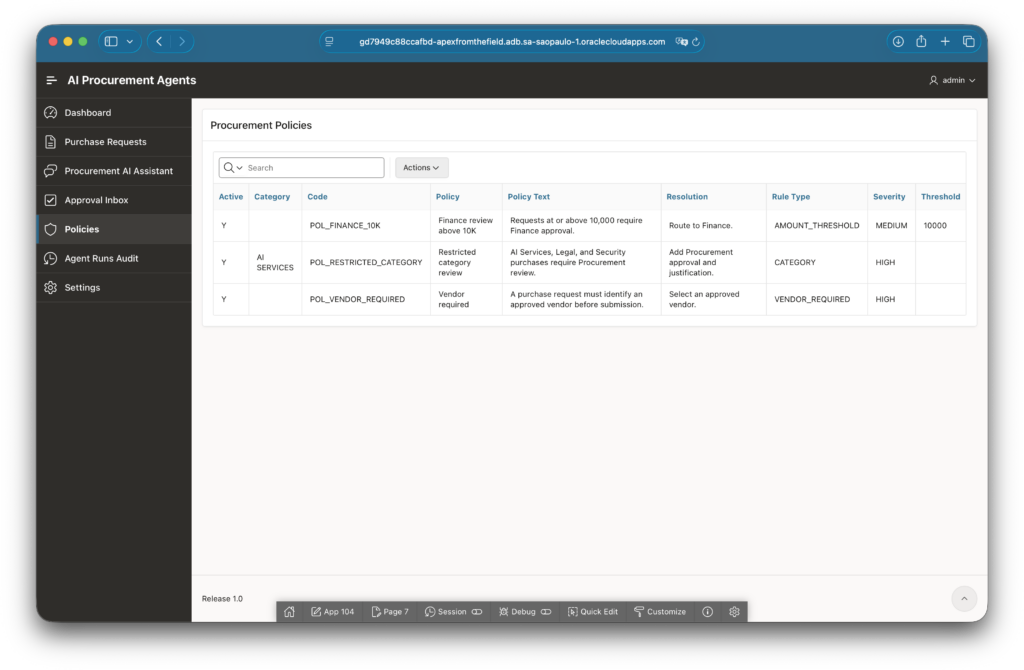
The policies are ordinary application data. The agent can explain them, but the deterministic checks still live in PL/SQL.
Why Procurement Is a Good Agent Scenario
A purchase request screen usually looks simple until a real user asks a practical question:
What should I do next with PR-1002?
That question is not just a lookup. To answer it well, the application needs to know:
- whether the request exists;
- its current workflow status;
- whether it has already been submitted;
- which policies apply;
- whether the vendor or category increases risk;
- who is the current approver;
- whether the user is asking for advice or asking to perform an action.
In a traditional UI, we usually answer those questions by spreading information across reports, detail pages, badges, buttons, and validation messages. That works, but it still requires the user to assemble the meaning manually.
With an AI Agent, the interface can become more conversational without becoming less controlled. The user asks the question in their own words. The agent retrieves the same data the application already trusts, calls the same policy logic, and turns the result into an explanation.
For PR-1002, the agent identified that the request was already pending approval, that it was high risk, and that the next operational step was with the current approver. The useful part is not the wording. The useful part is the chain of controlled tool calls behind the answer.
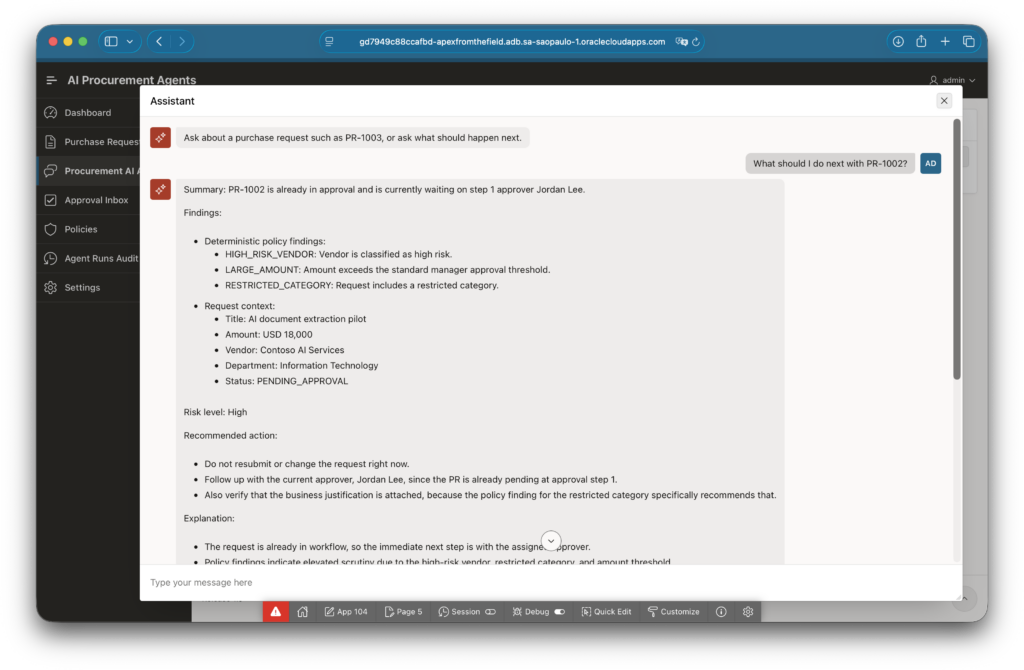
The user asks a natural-language question. The agent responds with application context, deterministic findings, and a recommended next step.
The Agent Loop In APEX Terms
For this demo, the native APEX AI Agent is configured as a Shared Component. The assistant uses a Generative AI Service, a system prompt, and a set of AI Tools.
The practical loop looks like this:
- The user asks something like “What should I do next with PR-1002?”
- The agent identifies that the request number is the business key.
- A tool retrieves purchase request context from the database.
- A tool retrieves deterministic policy findings from PL/SQL.
- A tool calculates or reads the approval route.
- The agent explains the result to the user.
- If the user asks to change state, APEX requires confirmation before the workflow tool runs.
The tools are intentionally narrow. For example, get_purchase_request_context does not give the model arbitrary database access. It returns the specific request context the agent is allowed to see. get_policy_findings does not ask the model to decide whether a purchase is compliant. It calls the policy engine and returns structured findings. submit_for_approval does not let the model update tables directly. It calls the workflow package.
That distinction matters. APEX AI Agents are most useful when they make the application easier to operate, not when they bypass the application architecture.
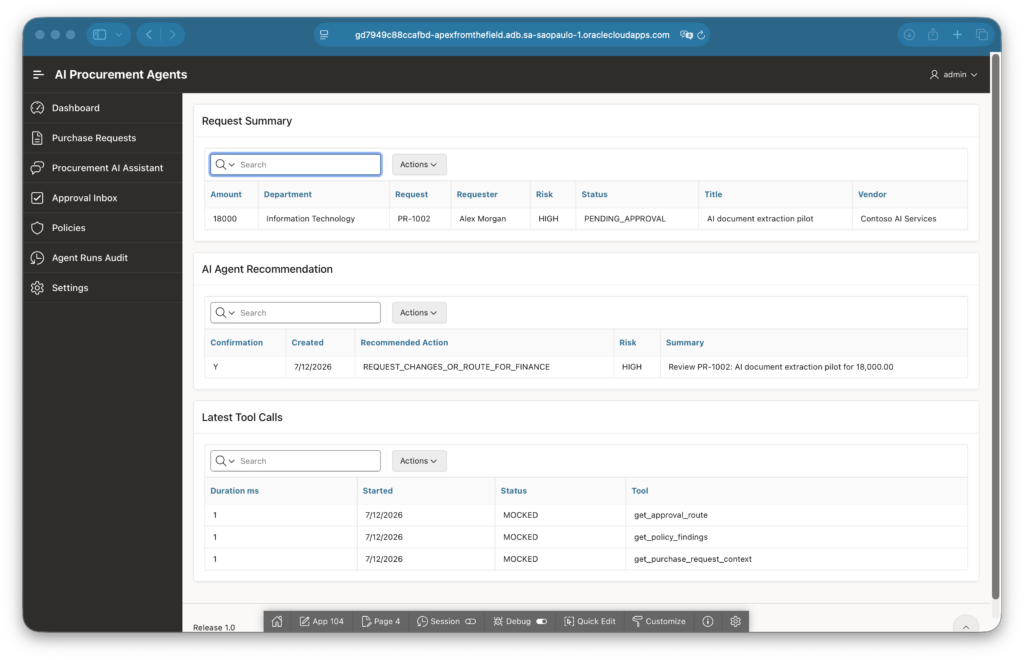
Behind the conversational answer, the application records the recommendation and the tool calls that produced it.
Confirmation Is Part Of The UX
One of the first things I wanted to test was a state-changing action. Reading policy findings is useful, but enterprise flows become interesting when the assistant can move from explanation to action.
For PR-1001, the request was low risk and ready to submit. The agent could explain that the next step was to submit it for approval, but the actual submission still required confirmation.
That is exactly the line I want in this kind of application. The assistant can reduce friction, but it should not silently perform sensitive workflow actions.
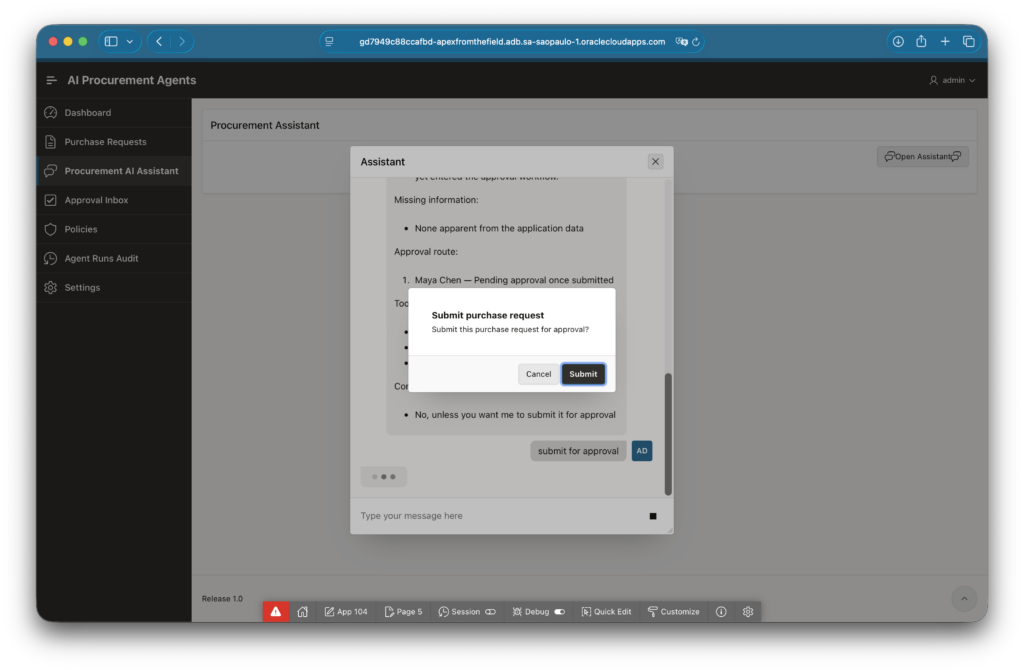
The assistant can propose the action, but APEX still asks the user to confirm before the workflow changes state.
After confirmation, the workflow package runs and the assistant reports the result back to the user. The request moves to PENDING_APPROVAL, and the user gets a plain confirmation message instead of having to infer the result from a refreshed report.
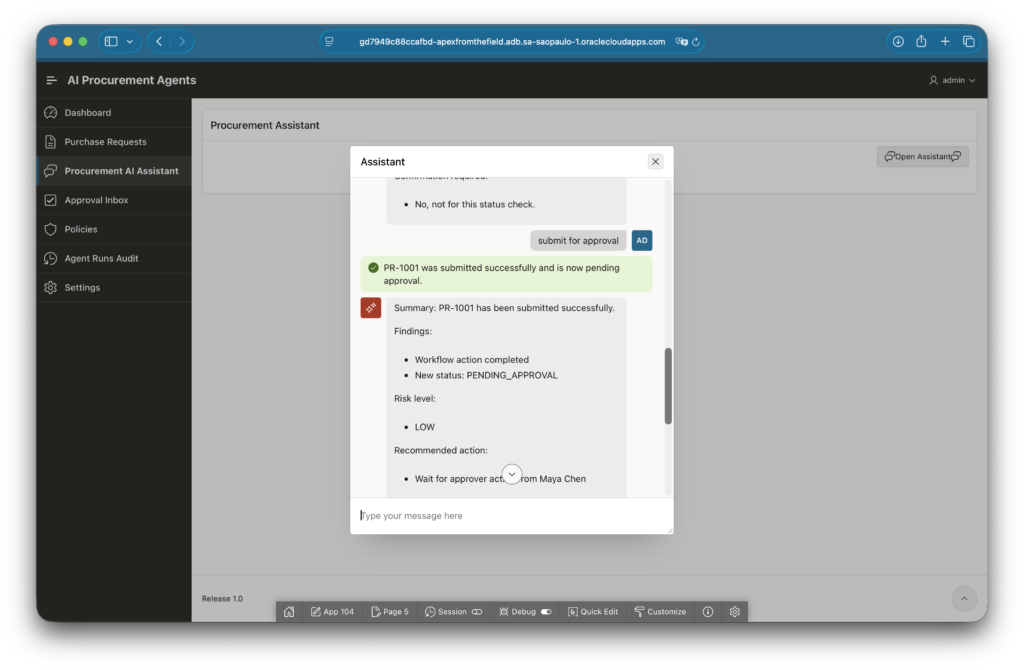
After confirmation, the controlled workflow tool runs and the assistant explains the new state.
Audit Matters
If an assistant is going to participate in a business process, I want to see what happened afterward.
For this demo, I kept audit tables for agent runs, messages, tool calls, and recommendations. This is not just for debugging. It gives the application owner a way to answer practical questions later:
- Which request did the agent evaluate?
- Which tools were called?
- Did the policy tool run before the recommendation?
- Was the run mocked or live?
- Which model and provider were used?
- Did a workflow action succeed or fail?
That kind of audit trail is boring in the best possible way. It is the part that makes the demo feel closer to something I would trust in a real application.
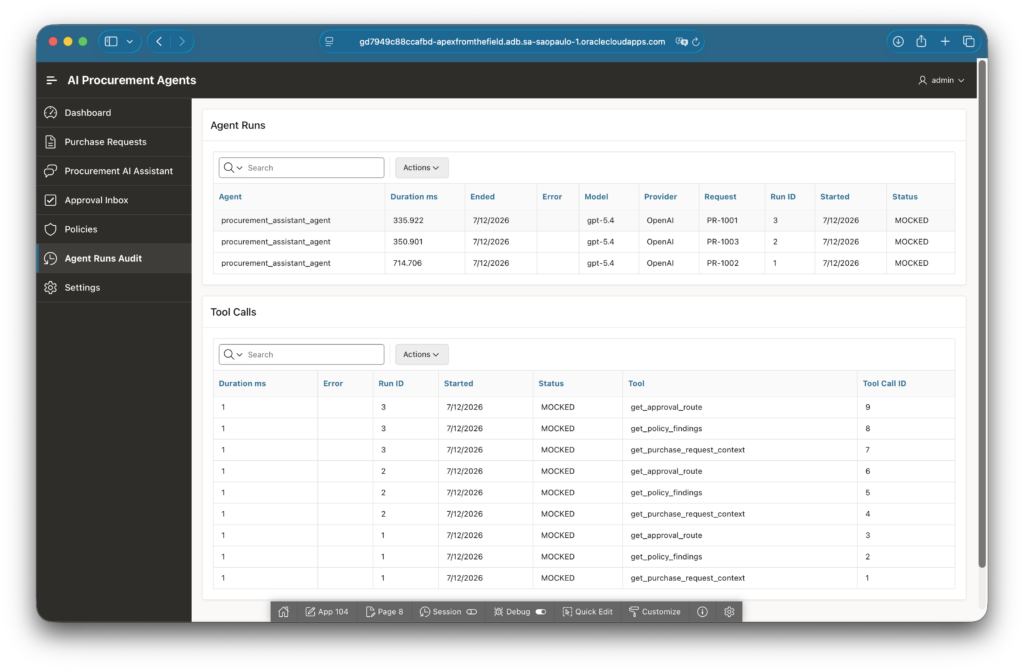
The audit page makes the agent activity visible: runs, tools, model, provider, status, and request context.
The Approval Inbox also shows the result in business terms. After submission, PR-1001 appears as pending approval for Maya Chen. PR-1002 remains a higher-risk request with a different recommendation and route.
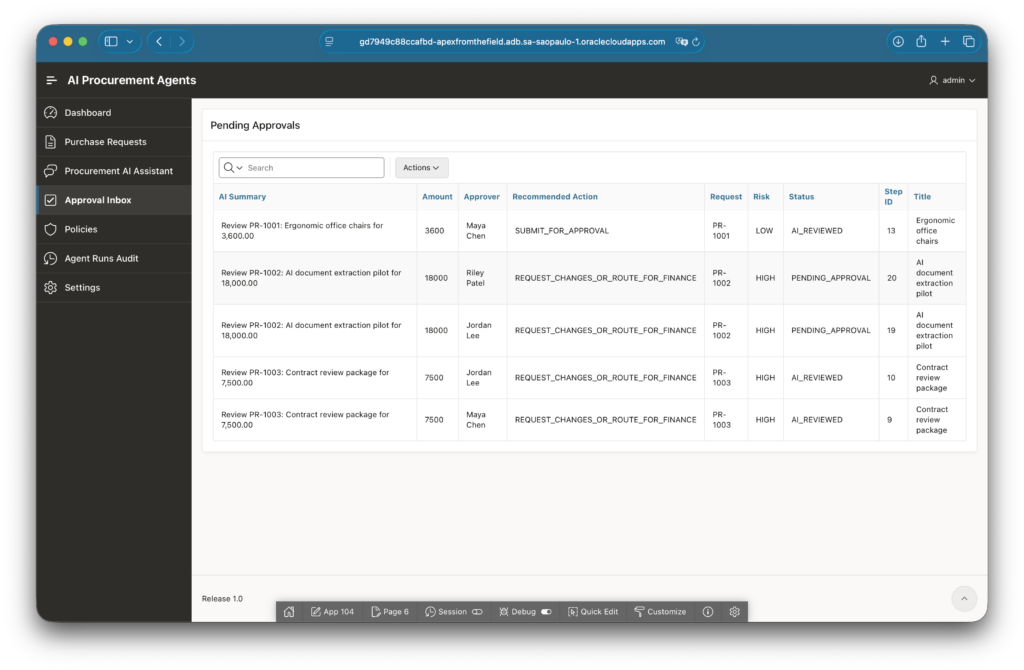
The assistant is not the system of record. The workflow state remains in the application and database.
What I Liked About This Feature
The best part of APEX AI Agents is that they fit naturally into the way many APEX applications are already built.
APEX applications usually have a strong database center of gravity. Business rules live in tables, packages, views, validations, and processes. That is a good foundation for AI tooling because the agent does not need to become the rule engine. It can become a better interaction layer over the rule engine.
In this demo, the same PL/SQL packages that power the application also power the tools:
PK_AIPA_POLICY_ENGINEevaluates procurement policies.PK_AIPA_WORKFLOWcontrols status transitions and approval steps.PK_AIPA_AGENT_ORCHESTRATIONrecords activity and supports deterministic mock runs.
This gives a clean separation of responsibilities:
- the model interprets intent and writes the explanation;
- APEX controls the assistant experience, tool definitions, and confirmation flow;
- PL/SQL enforces business behavior;
- the database stores state and audit.
That is a much healthier shape than putting procurement rules into a prompt and hoping the model follows them forever.
A Small Note About Mock And Live Testing
I used two modes while building the demo.
The mock path was useful to prove the application flow deterministically: seed data, policy findings, route calculation, recommendation records, and audit rows. This made it easier to test the APEX pages before depending on a live model.
Then I configured the native APEX AI Agent with the existing OpenAI Generative AI Service in the environment and tested the live assistant. That exposed the real integration details that matter in practice: tool parameters, server-side tool code, confirmation behavior, and friendly error messages when a workflow action is not allowed.
This is one of those places where the demo becomes more valuable because it was actually deployed and tested. Some of the interesting lessons only show up when the button is real.
The Main Takeaway
For me, the important lesson from this first APEX 26 AI Agent experiment is that enterprise AI does not need to start with a huge autonomous workflow. A very useful starting point is simpler: take a common application process, expose a few controlled tools, and let the assistant help the user understand what the system already knows.
In procurement, that means the user can ask:
- “What should I do next with PR-1002?”
- “Why is this request high risk?”
- “Can I submit PR-1001 for approval?”
- “Who needs to approve this?”
The answer can combine natural language with deterministic application logic. That is the sweet spot I want to explore more: AI improving usability without stealing ownership from the database, the workflow, or the human approver.
And yes, after waiting for my OCI APEX environment to reach version 26, this was a very satisfying way to celebrate.
The complete demo project is available on GitHub at denioflavio/ai-procurement-agents. The repository includes the Oracle APEX application export, database scripts, PL/SQL packages, seed data, setup notes, and the AI Agent configuration guide used in this post. It is not meant to be a production procurement system, but a practical reference for testing how native APEX AI Agents can work with controlled tools, deterministic business logic, workflow confirmation, and audit data.